Call sheet software
Call sheet software that builds itself from the schedule
Times, locations, running order, cast and crew are already in the schedule. TillyBoard turns them into the call sheet, with weather, sun times and the nearest hospital. You send it out by e-mail, and cast and crew confirm via link, without an account.
Create a call sheet for freeFree plan · No credit card
Teams shooting for these brands plan with TillyBoard





No more retyping the night before the shoot
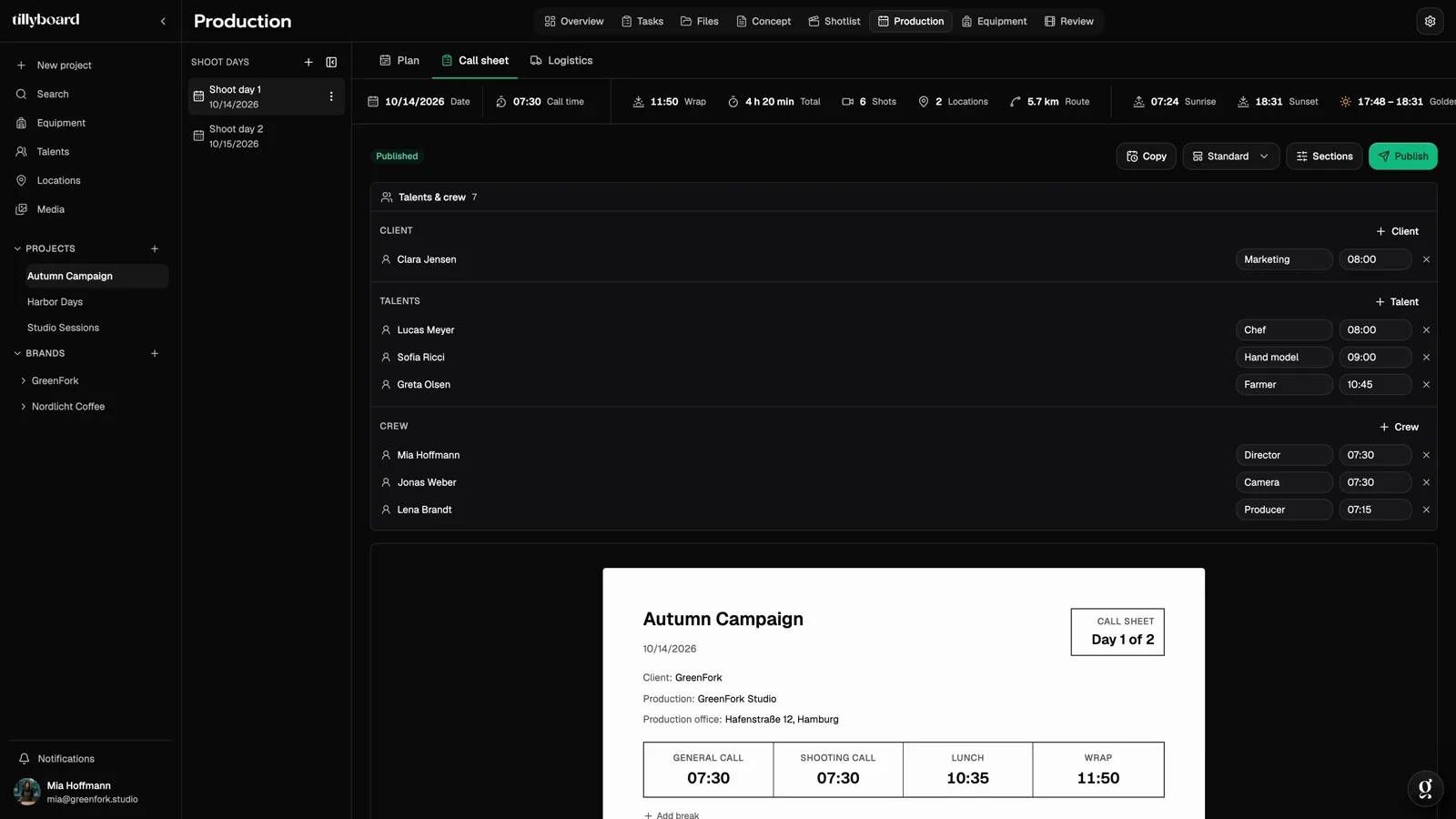
A call sheet from Word or Excel is a copy of the schedule. Every change has to be made in two places, and sooner or later the sheet shows an old time. In TillyBoard the call sheet is a view of the same shoot day.
From the plan, not retyped
General call, shooting call, lunch, wrap, locations, running order, cast and crew come from the project. You only add what isn’t anywhere else.
Sent and confirmed
Tick the recipients, add outside addresses, write a line for everyone. Confirmations come back into the project.
In the pocket and on the wrist
The day’s schedule and call sheet on iPhone, call times on Apple Watch, a PDF for everyone else.
How it works in three steps
From a planned shoot day to a confirmed call sheet in a few minutes.
-
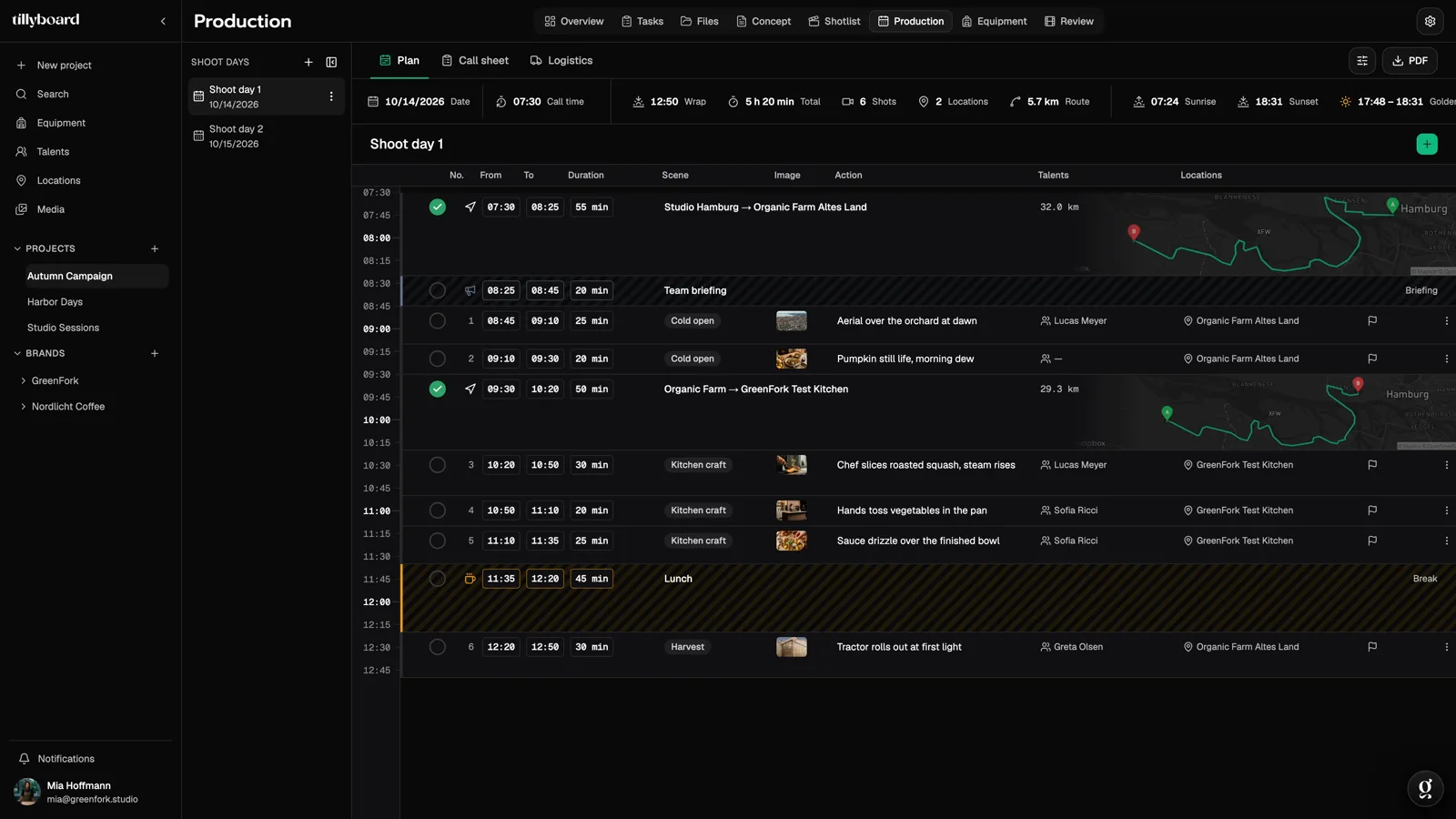 STEP 1
Plan the shoot day
Shots, company moves and breaks as blocks in the day. Every clock time follows from the call and the durations.
-
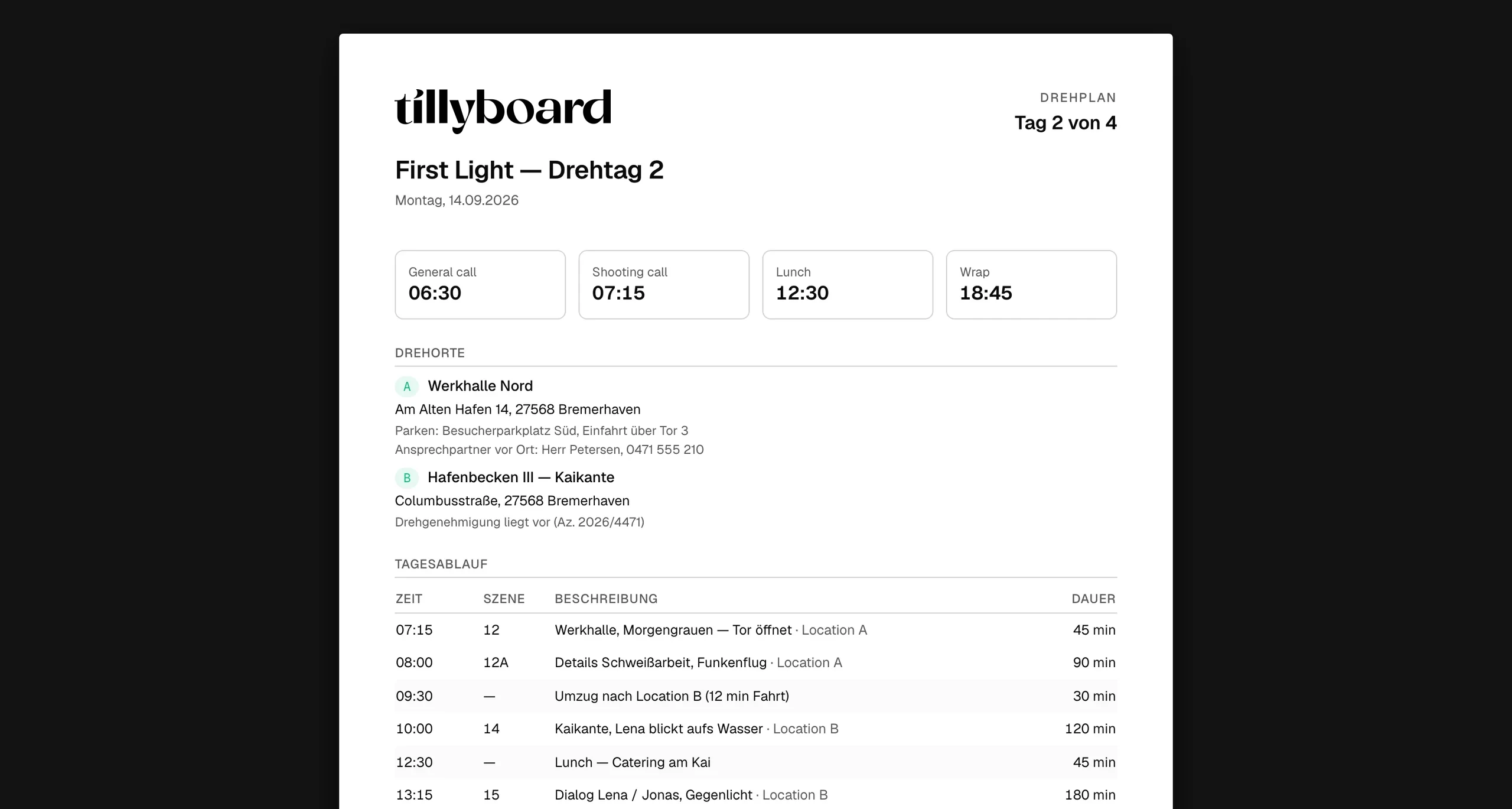 STEP 2
Check the call sheet
The call sheet is already there. Add parking notes, the contact on site or safety notes, and give everyone their own call time.
-
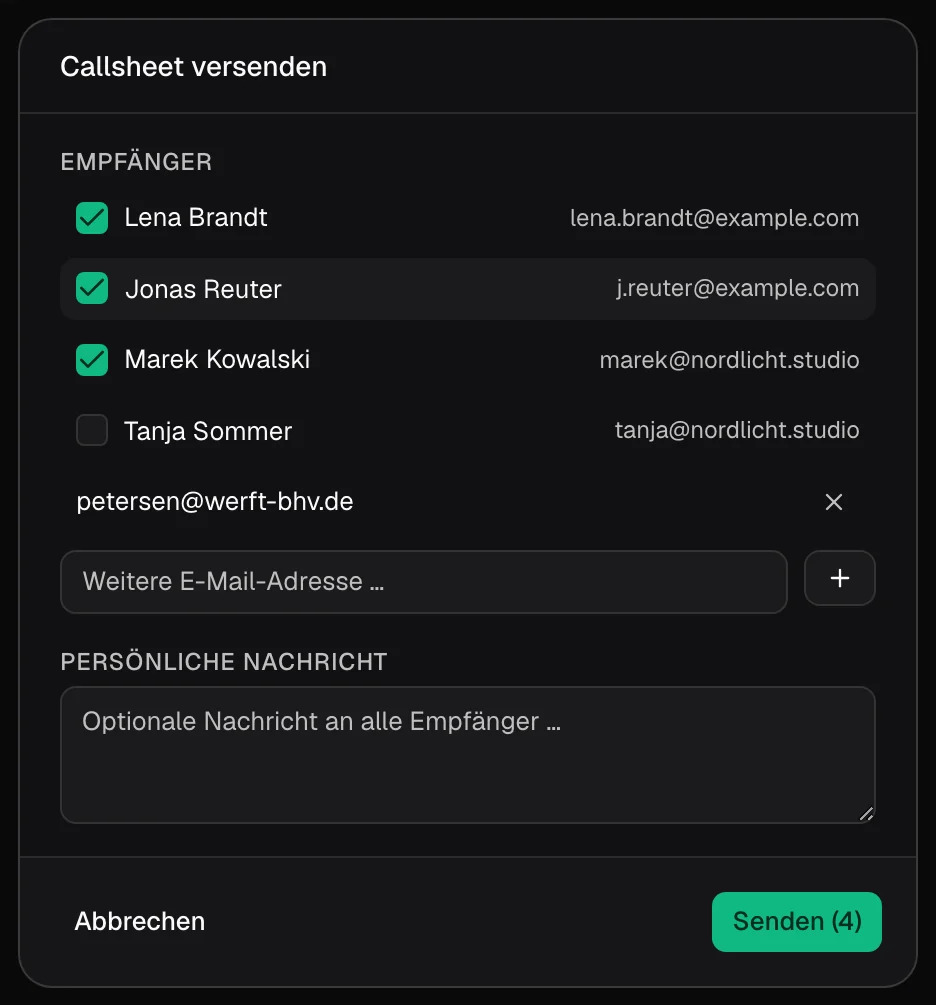 STEP 3
Send it and collect confirmations
Tick who gets it, add a message, send. Cast and crew confirm via link, without a TillyBoard login.
Everything people ask about in the morning
A call sheet is good when nobody has to phone the AD. That’s why the top shows what everyone looks for first, and the bottom what counts in an emergency.
Times at the top
General call, shooting call, lunch and wrap as four numbers. The first thing anyone reads.
Locations with everything around them
Address, parking, the contact on site and the permit reference. Plus the nearest hospital.
Running order, cast and crew
The running order with scene and duration, talents with call and makeup times, the crew with their calls. Notes on safety, sun and weather at the end.
A call sheet that stays current on set
Printed call sheets go stale the moment the plan changes. In TillyBoard the call sheet and the schedule hang off the same day.
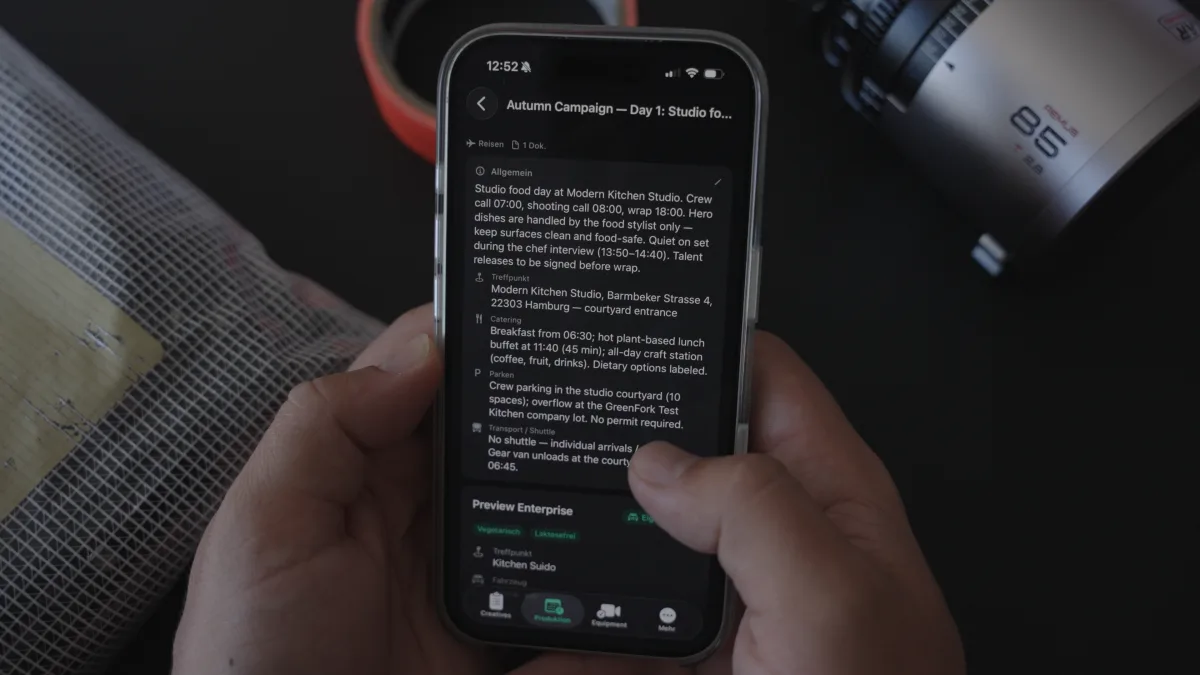
When the AD moves a shot, the schedule recalculates, and the times on the call sheet follow, because they come from the same day. Nobody has to maintain a second file.
Everyone has their own call time: the chef at 08:00, the hand model at 09:00, the director at 07:30. Apple Watch shows your own time, iPhone the whole day.
What changes on set shows up in the office seconds later. For everyone without the app, there is the call sheet as a PDF.
What is a call sheet?
A short guide for anyone writing their first call sheet, and a checklist for everyone else.
The definition
The call sheet is the document that tells everyone involved when they need to be where, and what happens on a shoot day. In German-speaking productions it is also called the Tagesdisposition, Tagesdispo or simply Dispo. It means the same thing: one sheet per shoot day, sent to cast and crew the day before.
The call sheet is usually put together by the assistant director or the production coordinator, based on the shooting schedule. So it is only as good as the plan behind it, and only as current as the last change to it.
What belongs on a call sheet
- Header: project, production company, client, date and which shoot day it is, for example day 2 of 4. Plus the production office address.
- Times: general call (when everyone meets), shooting call (first take), lunch and planned wrap.
- Light and weather: sunrise, sunset, temperature and chance of rain. For exteriors this decides clothing and running order.
- Locations: address, parking, the contact on site and, where needed, the permit reference.
- Emergency: the nearest hospital with its address and the emergency number. In the EU that is 112.
- Running order: the day’s scenes or shots in order, with time, location and duration, including moves and breaks.
- Cast: who is needed, with their own call time and times for makeup and wardrobe.
- Crew: every department with a contact and call time. Not every department has to arrive at the same time.
- Notes: safety, drone flights, animals, children on set, catering and anything that differs from the usual day.
When the call sheet goes out
It usually goes out the evening before the shoot day, as soon as the plan for the next day is locked. Send it at midnight and you risk someone seeing the change only on set. That’s why confirmation matters so much: it shows you who has actually read the current sheet.
Common mistakes
- The times on the call sheet no longer match the schedule, because only one file was updated.
- The nearest hospital is missing or wrong, because the sheet was copied from the last location.
- Everyone gets the same call time, and the cast waits three hours for their first shot.
- Parking notes are missing, and the camera truck is looking for a spot at 06:30.
- Nobody knows who has read the call sheet until someone is missing.
Tip: just need a single call sheet quickly? The free call sheet generator below makes one without signing up. As soon as several shoot days or changes come into play, building it from the schedule saves you the double upkeep.
Who it’s for
For anyone who writes call sheets more than once a year and doesn’t want to start from scratch each time.
Commercials
Client and agency are on the sheet with their own call time. Whoever comes from the client side sees when they are needed.
Brand films
Several locations in one day. Each with address, parking and contact, plus the move in the running order.
Social content
Small crews, fast shoots. The call sheet is done in minutes, because the plan already exists.
Corporate video
Interviewees from the company who don’t speak film jargon. They confirm via link, without an account.
Film schools and students
Learn what belongs on a call sheet with a tool that already knows the essential fields. The free plan includes the call sheet.
Production companies and in-house teams
Recurring formats and many shoot days. Every day has its call sheet, all of them in the project.
TillyBoard, StudioBinder and templates compared
You can make a call sheet with a Word or Sheets template, and StudioBinder is an established tool for it. The table only shows checkable points.
| Criterion | TillyBoard | StudioBinder | Template (Word / Sheets) |
|---|---|---|---|
| Free tier | Free plan including call sheets, no credit card | Free account available | Template free, software depends on vendor |
| Paid plans from | €22 per month (€19 billed annually), excl. VAT | See the vendor’s website | Not applicable |
| How it’s filled in | From the schedule: times, locations, running order, cast and crew | Schedule, locations, cast and crew are pulled in from the project | By hand |
| Weather and sun times | Yes, including golden hour | Weather, updated automatically | Entered by hand |
| Nearest hospital | Yes | Yes, hospital or emergency services can be added | Looked up by hand |
| Distribution | By e-mail, with outside addresses and a personal message; PDF export | By e-mail and text message | As an attachment, by hand |
| Confirmations | Via link, no account; they come back into the project | Status per recipient: viewed, confirmed or missed | Replies by e-mail or phone |
| Mobile | Apps for iPhone and iPad, call times on Apple Watch | Open and confirm on desktop and mobile | As a file or PDF |
As of October 2026. StudioBinder details from studiobinder.com (Call Sheet Software). Prices and features may change. All trademarks belong to their respective owners.
From teams planning with TillyBoard
“We plan everything in TillyBoard, from the first idea to the call sheet. One tool instead of three.”
“We finally have a structured workflow for our social media videos. From the first idea to the shoot, everyone knows what’s coming up.”
Call sheet FAQ
What is a call sheet?
The call sheet is a production’s document for the day. It tells cast and crew when they need to be where, what gets shot, what the weather will be and where the nearest hospital is. There is one call sheet per shoot day, usually sent the evening before.
What is a Tagesdispo?
Tagesdispo is short for Tagesdisposition, the term German-speaking productions use for the call sheet. Content and purpose are the same: times, locations, running order, cast, crew and notes for one shoot day.
What has to be on a call sheet?
At least project and date, general call, shooting call, lunch and wrap, the locations with address and parking, the nearest hospital, the running order, cast and crew with their call times, and notes on safety and weather.
Do I have to maintain the call sheet separately?
No. Times, locations, running order, cast and crew come from the project instead of being retyped. You send it from TillyBoard or export it as a PDF.
Does the crew need an account?
No. Cast and crew confirm the call sheet via link. Whoever plans with you works in the same project, with roles and permissions.
Is there a call sheet app?
Yes. The TillyBoard app for iPhone shows the day’s schedule and the call sheet, Apple Watch shows call times. Everyone else gets the PDF.
Can I put my own logo on the call sheet?
Custom branding on exports is included from the Team plan up, at €109 per month excl. VAT. On the other plans the export comes without your own branding.
Can I create call sheets for free?
Yes. The call sheet is included in every plan, including the Free plan, which is free forever and needs no credit card. Paid plans start at €22 per month excl. VAT and can be cancelled monthly.
Your next call sheet writes itself
Plan the shoot day, check the call sheet, send it out. The free plan covers your first shoot.
Further reading
Call sheet generator
A single call sheet, free and without signing up.
Call sheet template
Structure, how to fill it in and common mistakes.
Guide: create a call sheet
Step by step from the schedule to the call sheet.
Scheduling in TillyBoard
The shoot day the call sheet is built from.
Shooting schedule software
Shoot days in blocks, with daylight and drive times.
Crew contact sheet template
Every crew contact in one place.
Set safety briefing template
What gets covered before the first shot.
Daily production report template
What gets recorded after the shoot day.
Golden hour calculator
Sun times for any location.
Turnaround calculator
Check rest periods between two shoot days.
TillyBoard and StudioBinder
Where the two differ.
SetHero alternatives
Call sheet tools at a glance.