Shooting schedule software
Shooting schedule software for film and video production
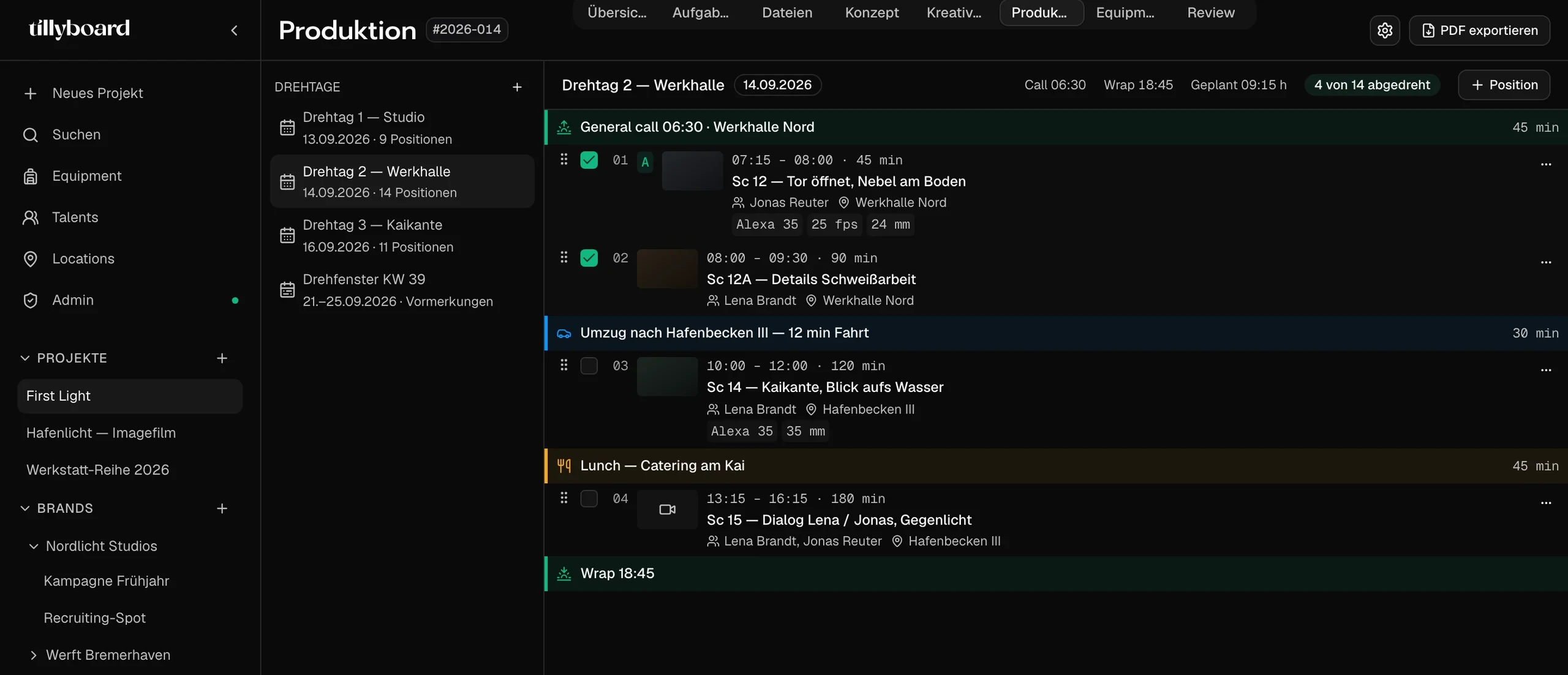
Plan every shoot day in blocks: shots, company moves with drive time and breaks, each in its own time slot. Move a shot and TillyBoard recalculates the rest of the day. Sun and weather sit above the plan, and the call sheet is built from the same day.
Build a shooting schedule for freeFree plan · No credit card
Teams shooting for these brands plan with TillyBoard





A shooting schedule that does the maths
In a spreadsheet a broken shoot day looks exactly like a working one. Move a scene and every time stays put until someone fixes it by hand. In TillyBoard the day is a sequence of blocks, and the times follow the order.
Times that move with you
Take a shot by its handle and drop it somewhere else. Start and end times of the blocks that follow are recalculated. Nobody retypes a single time.
Light and weather above the plan
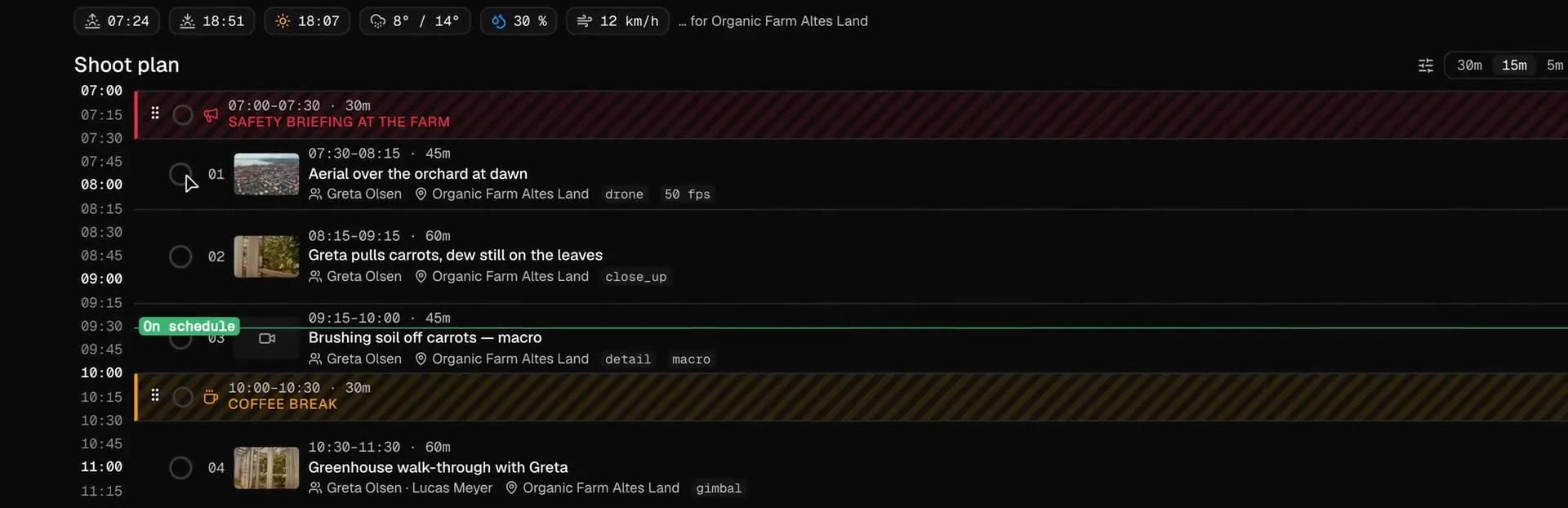
Sunrise, sunset, golden hour, temperature, chance of rain and wind for the location sit right above the first block.
The call sheet is already done
Times, locations, running order, cast and crew come from the plan. You send the call sheet from TillyBoard instead of retyping it.
How it works in three steps
From the shot list to a finished shoot day, without copying a single line.
-
 STEP 1
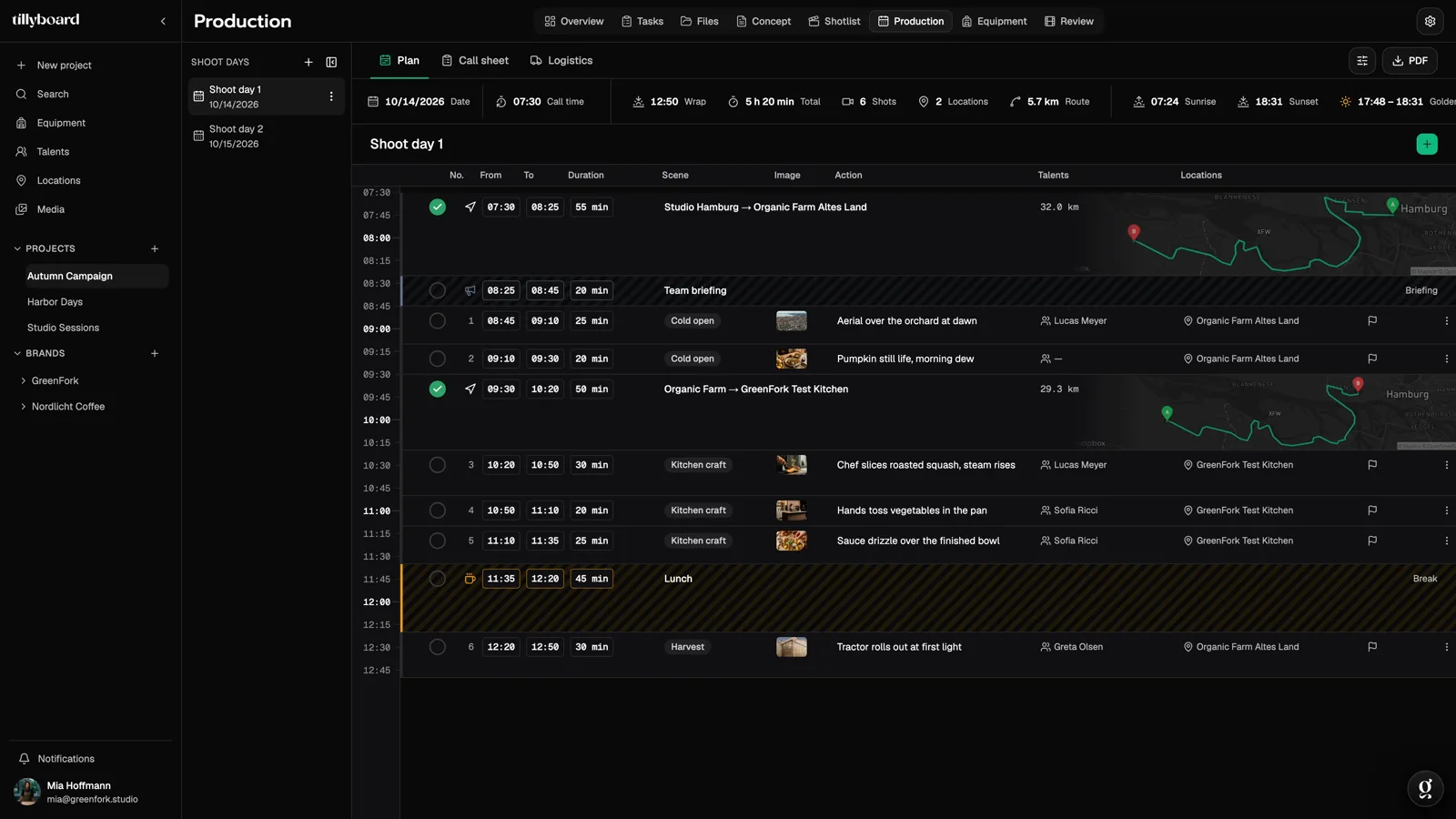
Create the shoot days
Every shoot day is its own plan. The shots come from the shot list, with preview frame, cast and location. Add briefings, company moves and breaks as blocks of their own.
-
 STEP 2
Set the order
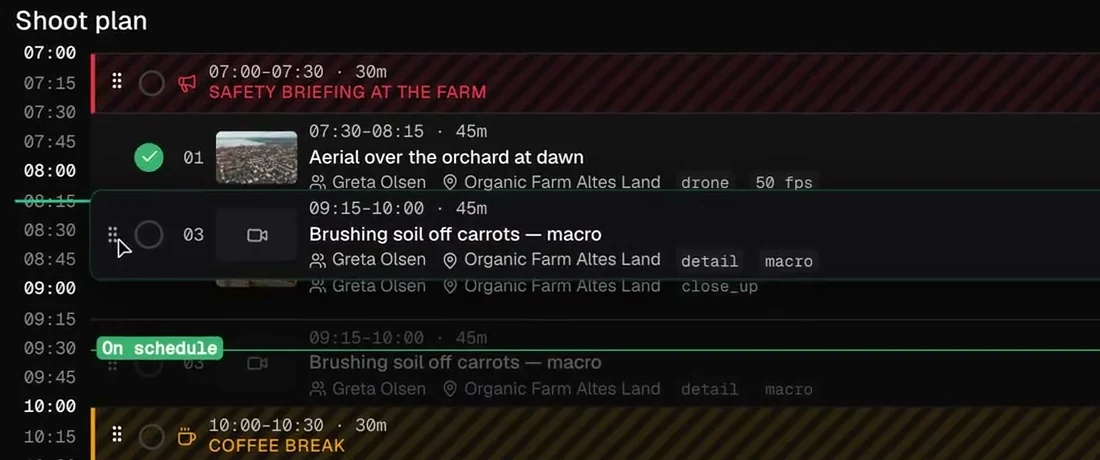
Drag shots to where light and location work. The times recalculate, and elements can also move between shoot days.
-
 STEP 3
Check the light, send the call sheet
Check that the exteriors sit in the light. Then the call sheet from the same day goes to cast and crew, who confirm it via link.
Move a shot, the day recalculates
No shooting schedule survives the first cancellation. What matters is how fast the new plan is ready.
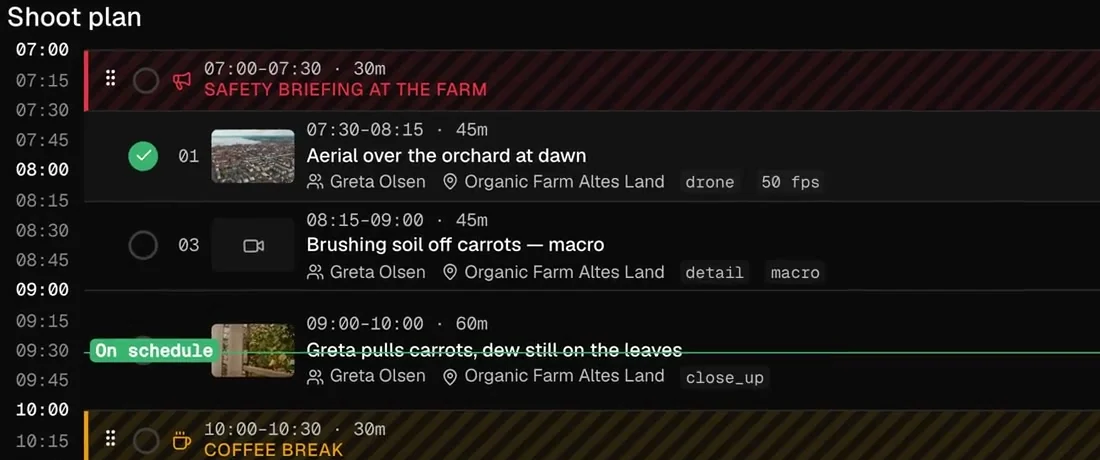
Grab and drop
Take a shot by its handle and drop it where it belongs. Here the carrot macro moves ahead of the close-up.
The times follow
The macro now runs from 08:15 to 09:00, the close-up after it from 09:00 to 10:00. Wrap and total duration sit at the top of the day.
Where the day stands
Shots in the can get their tick. A line marks the current time, with a label that tells you whether you are on schedule.
Moves and breaks are blocks too
A shoot day isn’t only shots. What happens in between costs just as much time, so it sits in the same plan.
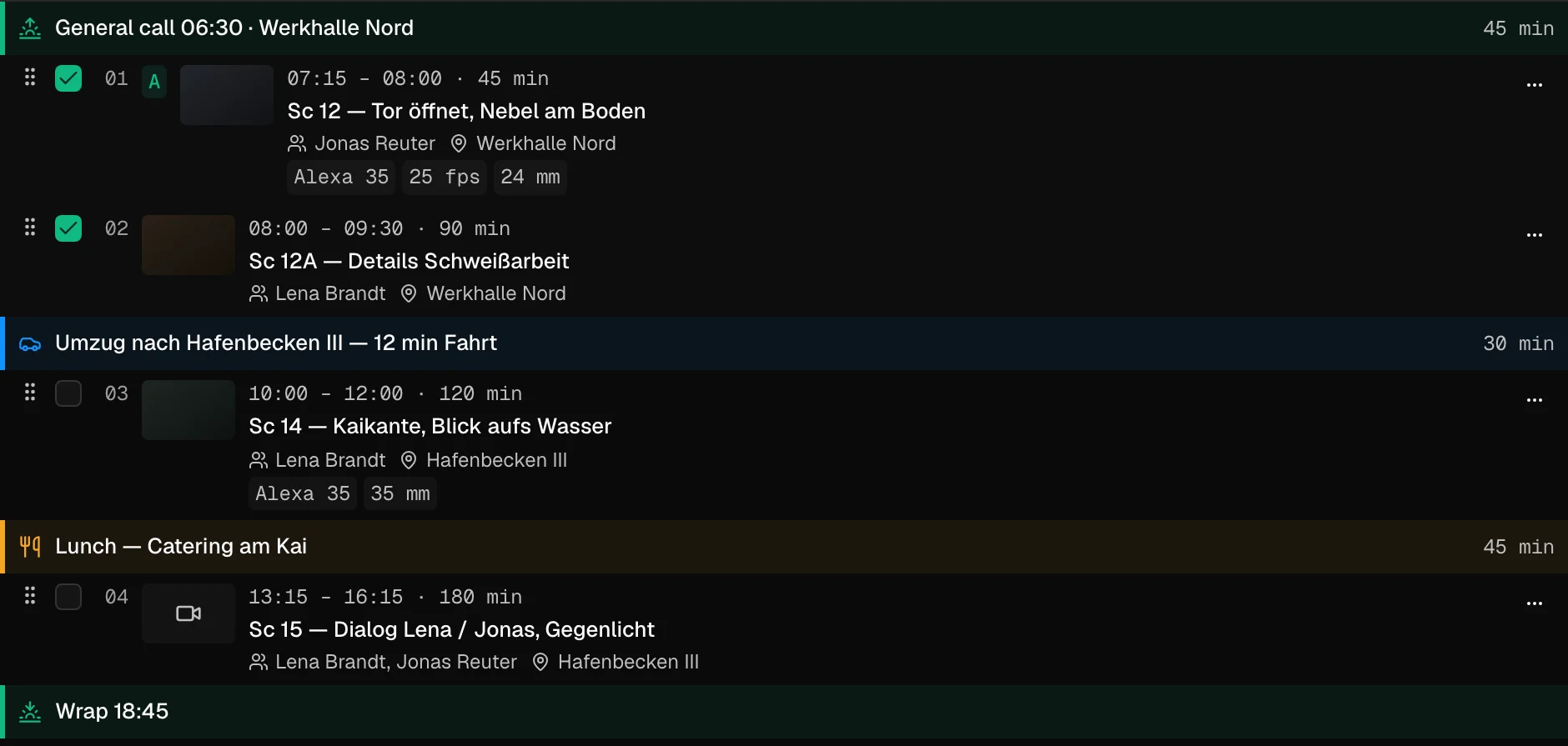
Company move with drive time
The move to the next location gets its drive time and a route. You see what it costs before you commit to it.
Breaks with their own slot
Lunch gets its 45 minutes and sits in the day like any shot. The maths simply carries on after it.
Briefings and resets
The morning safety briefing, the reset between two setups: they are blocks with a duration too, so the day stays honest.
One plan, the same for everyone
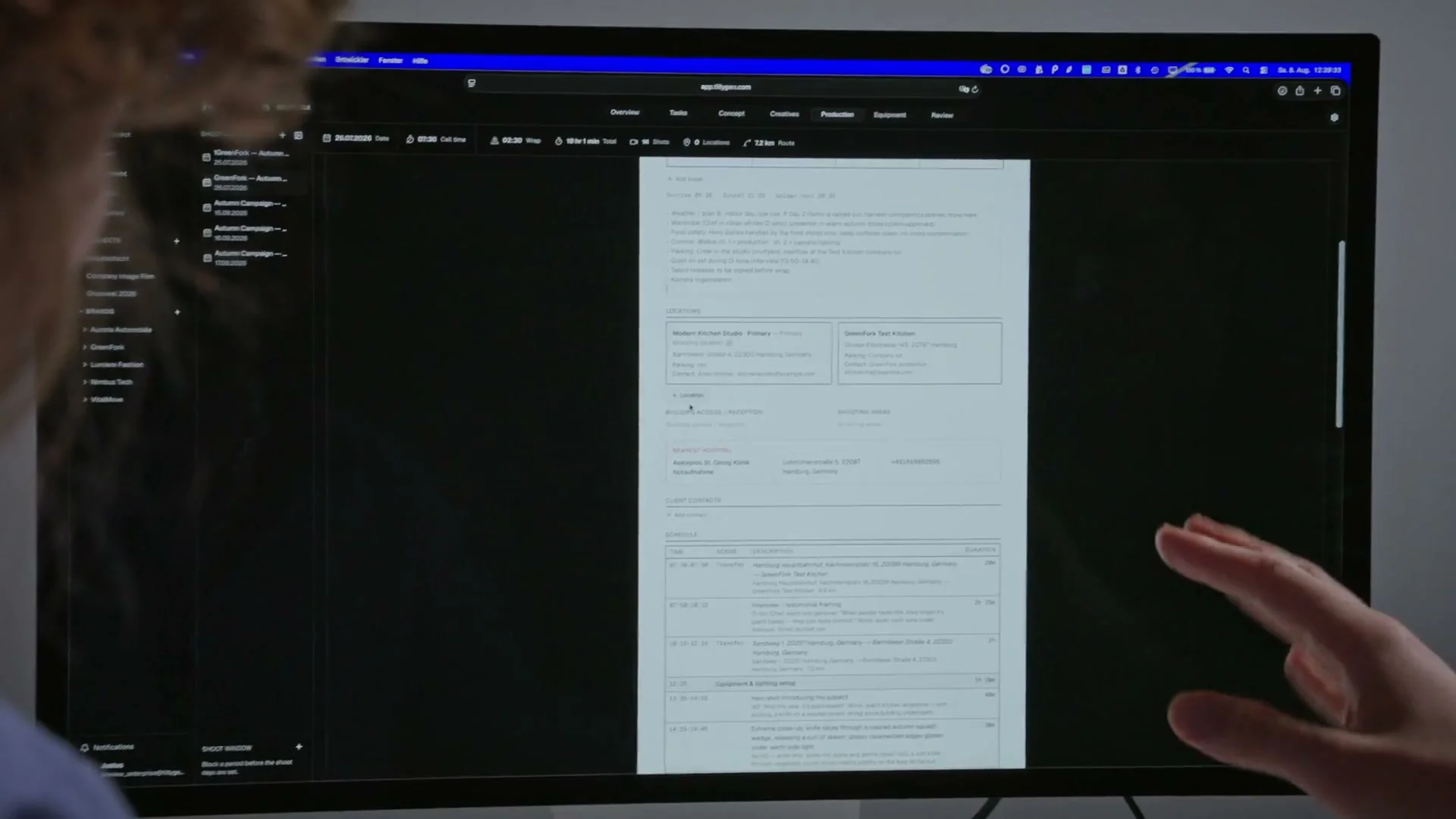
Plan together
Director, producer and AD work in the same project at the same time, with roles and permissions.
In sync on set
The day’s schedule on iPhone, call times on Apple Watch. What changes on set shows up in the office seconds later.
Out as PDF or CSV
The schedule is available as a PDF for everyone without an account and as CSV for scheduling software.
How to build a shooting schedule
A good shooting schedule isn’t written top to bottom; it’s built around the fixed points. Here’s how to go about it, with or without software.
1. List everything that gets shot
The basis is the shot list or the script breakdown. For every shot you need at least the location, interior or exterior, day or night, cast and special requirements such as a drone, a crane, children or animals. Whatever is missing here will surface on the shoot day instead.
2. Group by location
You almost never shoot in story order. Group everything that plays at the same location, because every move costs a wrap, a drive and a set-up. If a move can’t be avoided, plan it as a block of its own with a realistic drive time.
3. Lock the fixed points first
- Light: exteriors belong in the window between sunrise and sunset, mood shots in the golden hour.
- Availability: cast with only a few days, locations with a limited permit and rented gear decide which day gets what.
- Breaks and rest periods: in Germany, the Working Hours Act requires a 30-minute break after more than six hours of work and 45 minutes after more than nine. Plan them as a block, not as a hope.
4. Estimate time per setup
You plan time on set, not the length of the shot in the film. A two-second product shot with a lighting change can take an hour. Allow reset time for every lighting or camera change and leave some air at the end of the day.
5. Order the day
Start with what needs the most focus or the best light. Don’t keep cast who are only needed briefly on set all day, and schedule makeup and wardrobe before the first shot that person appears in.
6. Build in plan B and buffer
For exterior shoots, define a cover set or a backup day and mark which shots can be dropped if needed. A schedule without buffer is a wish list.
7. Publish it and keep it current
The finished day turns into the call sheet. When something changes, the change has to land in the plan and on the call sheet. This is exactly where spreadsheets and separate documents most often drift apart.
Stripboard or block plan?
A stripboard is the classic form of the shooting schedule: one coloured strip per scene, sorted into shoot days, with the colour showing interior or exterior and day or night. For long features with many scenes it is strong. Commercials and brand films tend to think in shots and clock times instead. That’s why TillyBoard plans each day as a sequence of blocks with time slots, and exports the plan as CSV if you want to keep working on it in stripboard software.
Tip: want to practise with a shooting schedule template first? The template below shows the columns every schedule needs. As soon as there’s more than one shoot day, software saves you the recalculating.
Who it’s for
For productions where a shoot day rarely has more than a few locations, but every hour counts.
Commercials
One or two shoot days, expensive cast, tight light. The plan shows whether the hero shots land in the golden hour.
Brand films
Several locations, moves and interviews. Drive times and breaks sit in the day before they blow up the plan.
Social content
Many short formats in one day. Every shot is a block, and finished shots get their tick.
Corporate video
Interviewees with fixed time slots. Their call times sit in the plan and on the call sheet.
Film schools and students
Learn scheduling the way it’s needed on set. The free plan covers one project of your own.
Production companies and in-house teams
Several shoots in parallel. One inventory, one workspace, and every shoot day in its own plan.
TillyBoard, StudioBinder and spreadsheets compared
Many shooting schedules start in Excel or Google Sheets, and that’s an honest starting point. The table shows checkable differences, not a verdict.
| Criterion | TillyBoard | StudioBinder | Excel / Google Sheets |
|---|---|---|---|
| Free tier | Free plan: 1 own project, no credit card | Free account available | Google Sheets free with a Google account; Excel with a Microsoft 365 subscription or licence |
| Paid plans from | €22 per month (€19 billed annually), excl. VAT | See the vendor’s website | Not applicable |
| Schedule format | Day plan in blocks with time slots; CSV export for scheduling software | Stripboards | Rows and colours you build yourself |
| Call sheet from the plan | Yes, times, locations, running order, cast and crew come from the project | Yes, schedule, locations, cast and crew are pulled in from the project | Separate document, filled in by hand |
| Weather | Sunrise, sunset, golden hour, temperature, rain and wind above the plan | Weather on the call sheet, updated automatically | Entered by hand |
| Crew confirmations | Via link, no account needed | Status per recipient: viewed, confirmed or missed | Not built in |
| Mobile | Apps for iPhone and iPad, call times on Apple Watch | Open and confirm call sheets on desktop and mobile | Apps from Google and Microsoft |
As of October 2026. StudioBinder details from studiobinder.com (Call Sheet Software). Prices and features may change. All trademarks belong to their respective owners.
From teams planning with TillyBoard
“We finally have a structured workflow for our social media videos. From the first idea to the shoot, everyone knows what’s coming up.”
“We plan everything in TillyBoard, from the first idea to the call sheet. One tool instead of three.”
Shooting schedule software FAQ
What is shooting schedule software?
A program in which you decide what gets shot on which day and when. Unlike a spreadsheet, it recalculates the times when the order changes. In TillyBoard the shots come from the shot list, and the finished day turns into the call sheet.
How do I build a shooting schedule in TillyBoard?
Create shoot days, add shots from the shot list and fill in company moves, breaks and briefings as blocks. Arrange everything by drag and drop. TillyBoard works out start and end times from the call and the durations before them.
Is TillyBoard stripboard software?
TillyBoard plans each shoot day as a sequence of blocks with time slots rather than as coloured strips. You can export the schedule as CSV for scheduling software if you also work with a classic stripboard.
Does the plan know about daylight?
Yes. Above the shoot plan TillyBoard shows sunrise, sunset and golden hour for the location, plus temperature, chance of rain and wind. You place the exteriors inside the window where they can be shot.
What happens when I move a shot?
You drag it by its handle to the new slot. Start and end times of the blocks that follow are recalculated. Elements can also be moved between shoot days.
Can I plan multi-day shoots?
Yes. Every shoot day is its own plan with its own call, its own wrap and its own call sheet. The call sheet shows which day of how many it is.
Can I export the schedule?
Yes, as a PDF for everyone without an account and as CSV for scheduling software. Custom branding on exports is included from the Team plan up.
Is there a free version?
Yes. The Free plan is free forever and needs no credit card. It covers one own project with schedule and call sheet. Paid plans start at €22 per month excl. VAT and can be cancelled monthly.
Plan your next shoot day in TillyBoard
Create a shoot day, drag the shots into the right order and send out the call sheet. The free plan covers your first shoot.
Further reading
Scheduling in TillyBoard
Every feature, with a video from the real app.
Shooting schedule template
Structure, how to fill it in and common mistakes.
Stripboard template
The classic strip format of the schedule.
Guide: plan a stripboard schedule
Sort scenes, build days, read the colours.
Schedule a multi-day shoot
Locations, cast and rest periods across several days.
Recover a slipping schedule
What to cut when the day no longer adds up.
Shoot day planner
Setups, moves and lunch as a timeline — with wrap time and overtime.
Sun & light planner
Golden hour and sun direction for any location and date.
Weather risk planner
How many cover days your exterior days need.
Rest period check
Check a whole shoot week against rest-period rules.
TillyBoard and StudioBinder
Where the two differ.
Call sheet software
The call sheet straight from the schedule.