Storyboard software
Storyboard software for film and video production
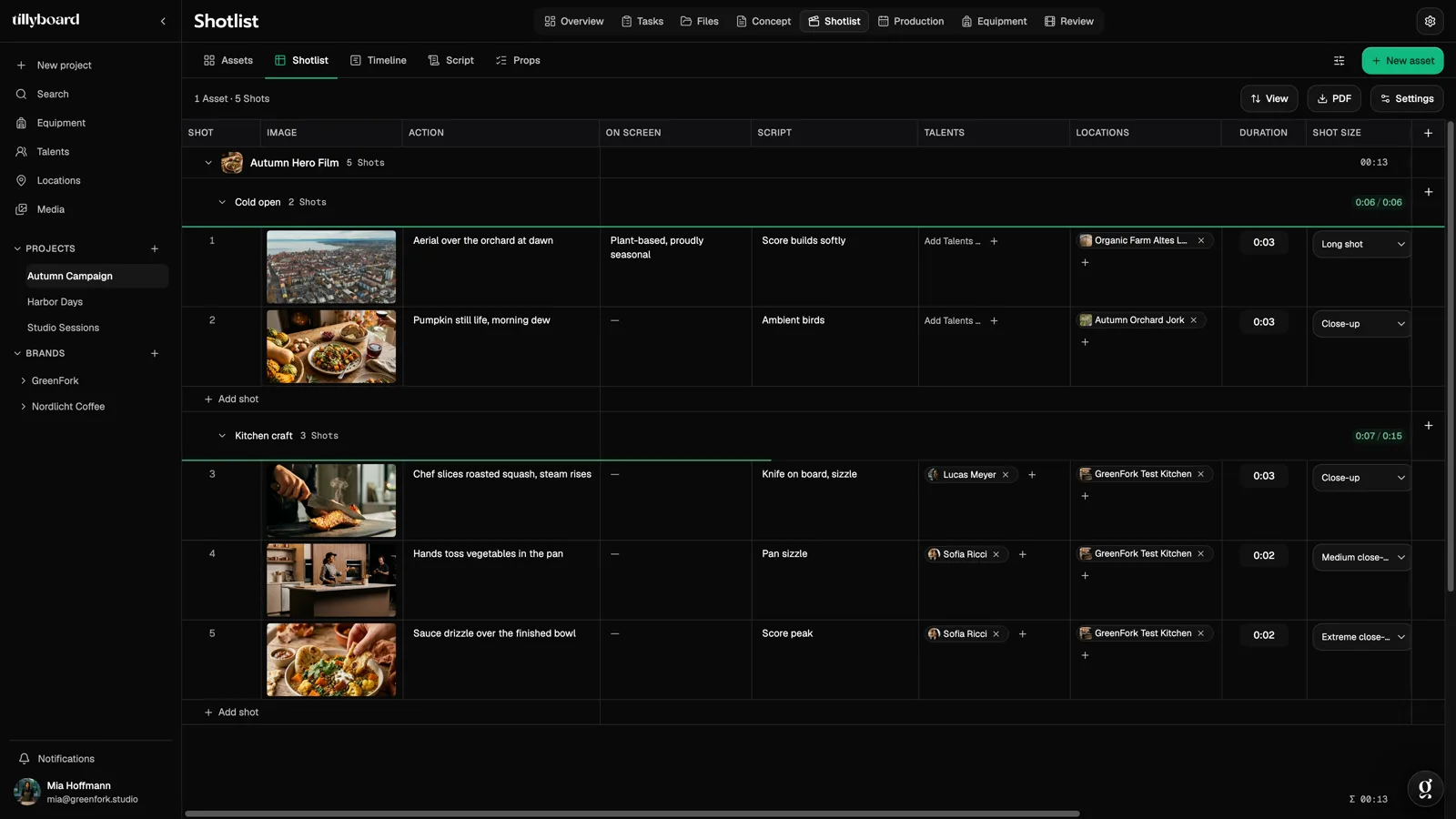
Write each shot down once, with action, cast, location and duration, and TillyBoard turns the rows into preview frames. The storyboard is your shot list in pictures. When the client wants one more shot, nothing gets copied from one document into the next.
Create a storyboard for freeFree plan · No credit card
Teams shooting for these brands plan with TillyBoard





A storyboard that grows with the shot list
Most storyboards get made twice: once as a list, once as a sequence of frames in a slide deck or PDF. From the first change on, the two drift apart. In TillyBoard every frame belongs to exactly one shot row.
One source, two ways to look at it
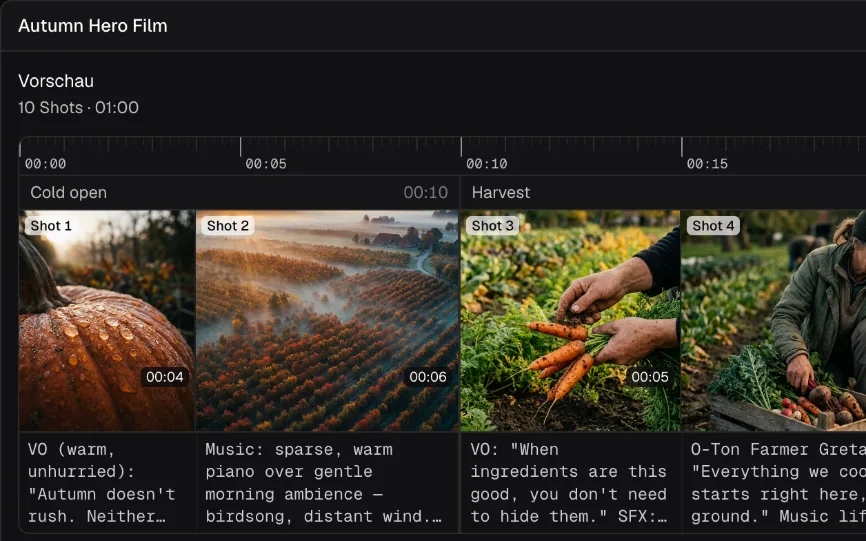
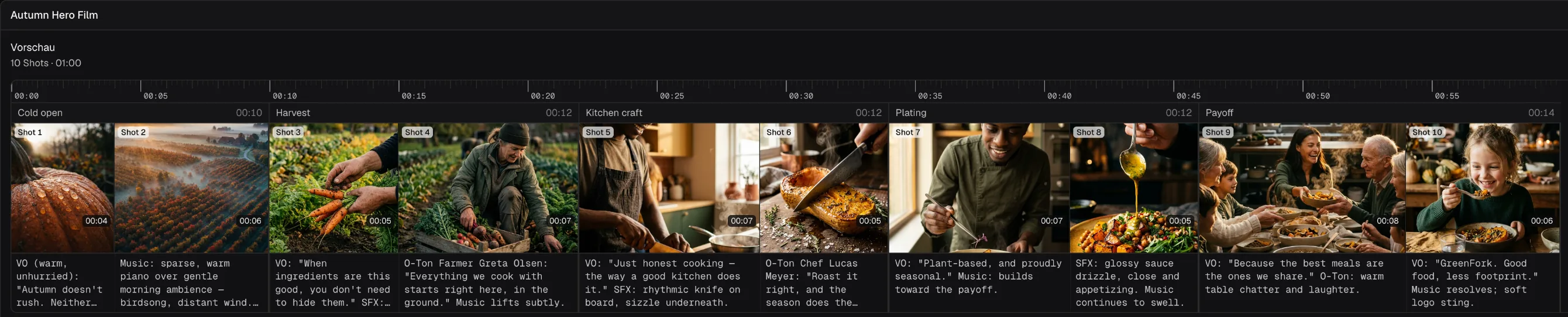
Action, sound, on-screen text and the preview frame sit in the same row. Creatives, Timeline and Script show the same shots, not a copy. What you change in one place shows up in the others.
Frames without a sketch artist
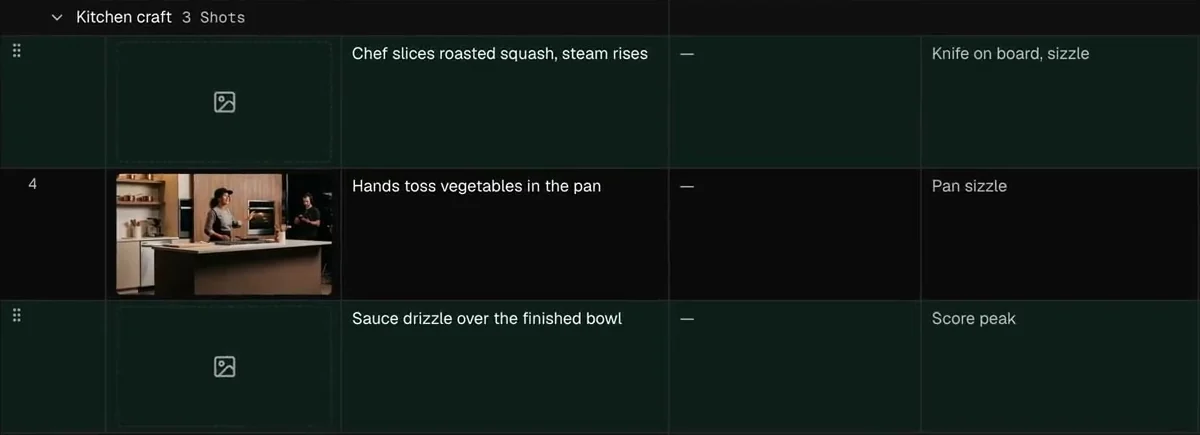
Select the rows, click Generate images, and every shot gets a frame for framing and mood. Built from the action text you write anyway.
The runtime in view
Every segment adds up its shots against its target. Green fits, red runs long. You know before the shoot whether the 30-second spot fits into 30 seconds.
How it works in three steps
From the brief to a finished board, without a drawing app and without slides.
-
 STEP 1
Pin down the idea and the shots
Treatment, moodboard and brief live in the project. Tilly AI writes the first draft if you want one, you set the direction. Then you add the shots: one row per setup, grouped into segments.
-
 STEP 2
Generate the preview frames
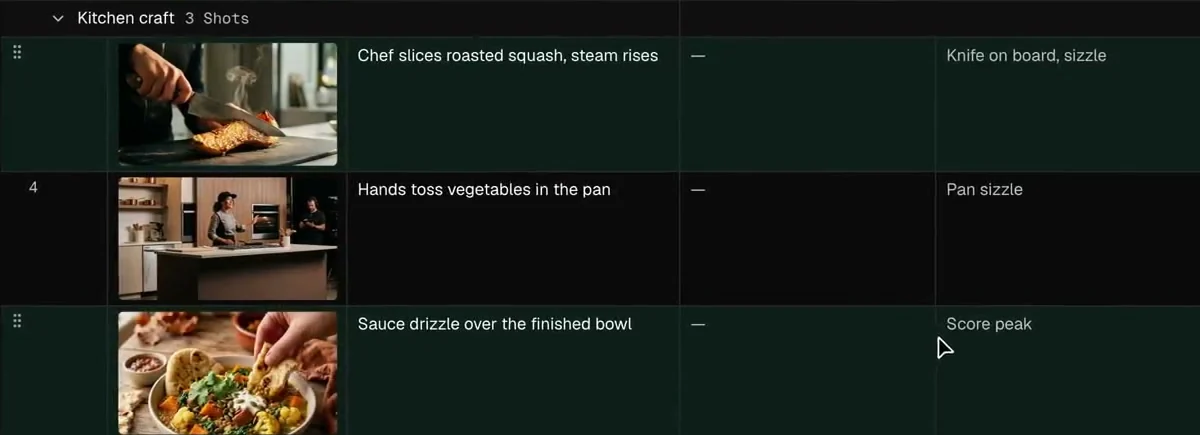
Select the rows and click Generate images. Each frame is built from the shot’s action text. Tick the option and your talents’ headshots and your location photos go in as references.
-
 STEP 3
Check, share, shoot
The counters show where a segment runs long. Then the board goes to client and crew as a PDF or image export, and the same shots move into the shooting schedule.
Preview frames for shots nobody has drawn yet
A storyboard is there to settle what is in the frame before anyone builds a camera. That doesn’t take a work of art, it takes a picture everyone can talk about.
From the text you already have
“Chef slices roasted squash, steam rises” is enough. The frame is built from the action text, with no extra prompt field.
Your cast, your locations
Talent headshots and location photos go in as references when you tick the option. The board then looks like your shoot, not just any shoot.
A reference, not the picture
The preview shows the crew framing and mood. The picture itself is still made on set, by the director and the camera team.
Every frame with everything the crew needs to know
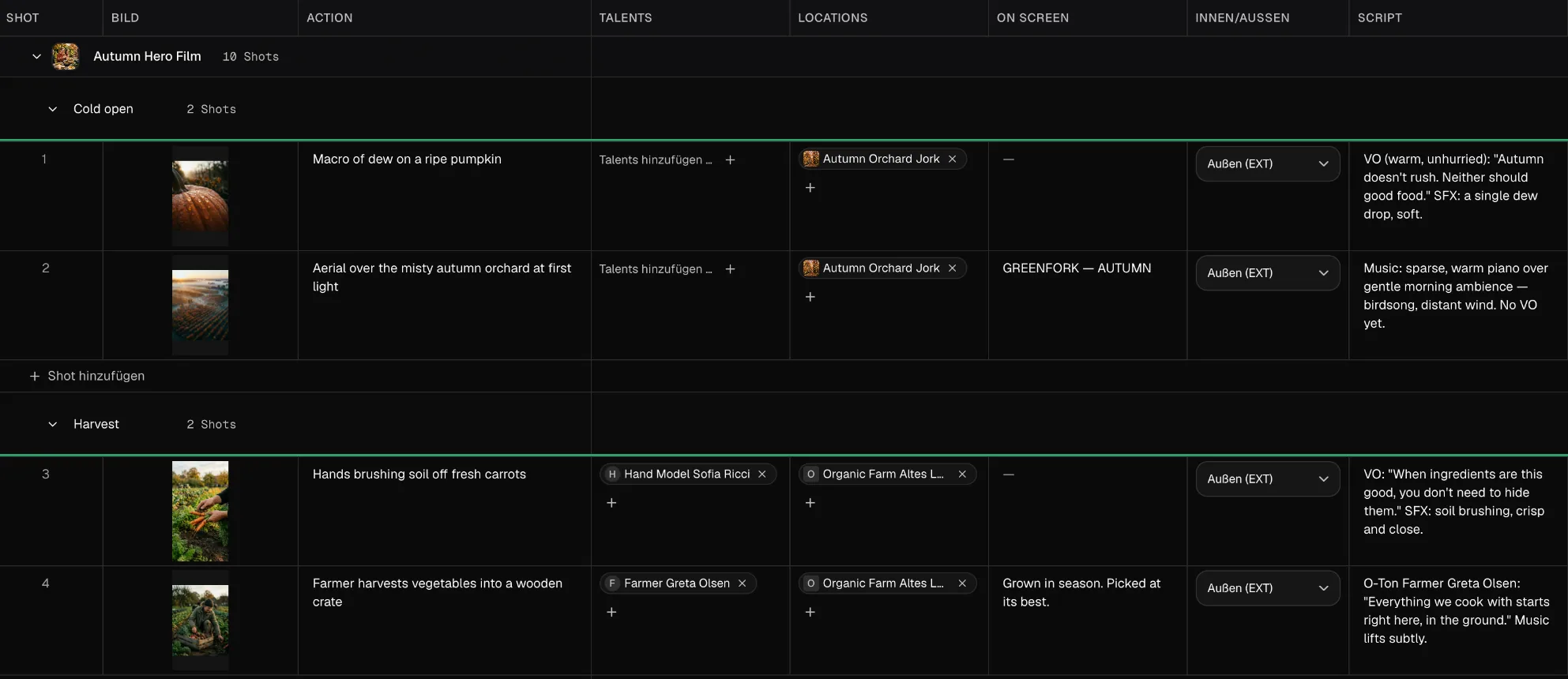
A picture alone doesn’t explain a shoot. Next to every frame sit the columns people ask about on set.
Action, sound, on-screen text
What happens, what you hear and which line is overlaid. For commercials with a claim and legal copy, that is half the sign-off.
Talents and locations
Cast and locations live in the project. In the row you only search and pick, and anyone new is added on the spot.
Duration and shot size
Every shot has its seconds and its shot size, from long shot to extreme close-up. The list closes with the total across all creatives.
From the board straight into the shoot day
A storyboard is only as good as the day it gets shot on. That’s why in TillyBoard the shots don’t stop at the board.
The frame comes along
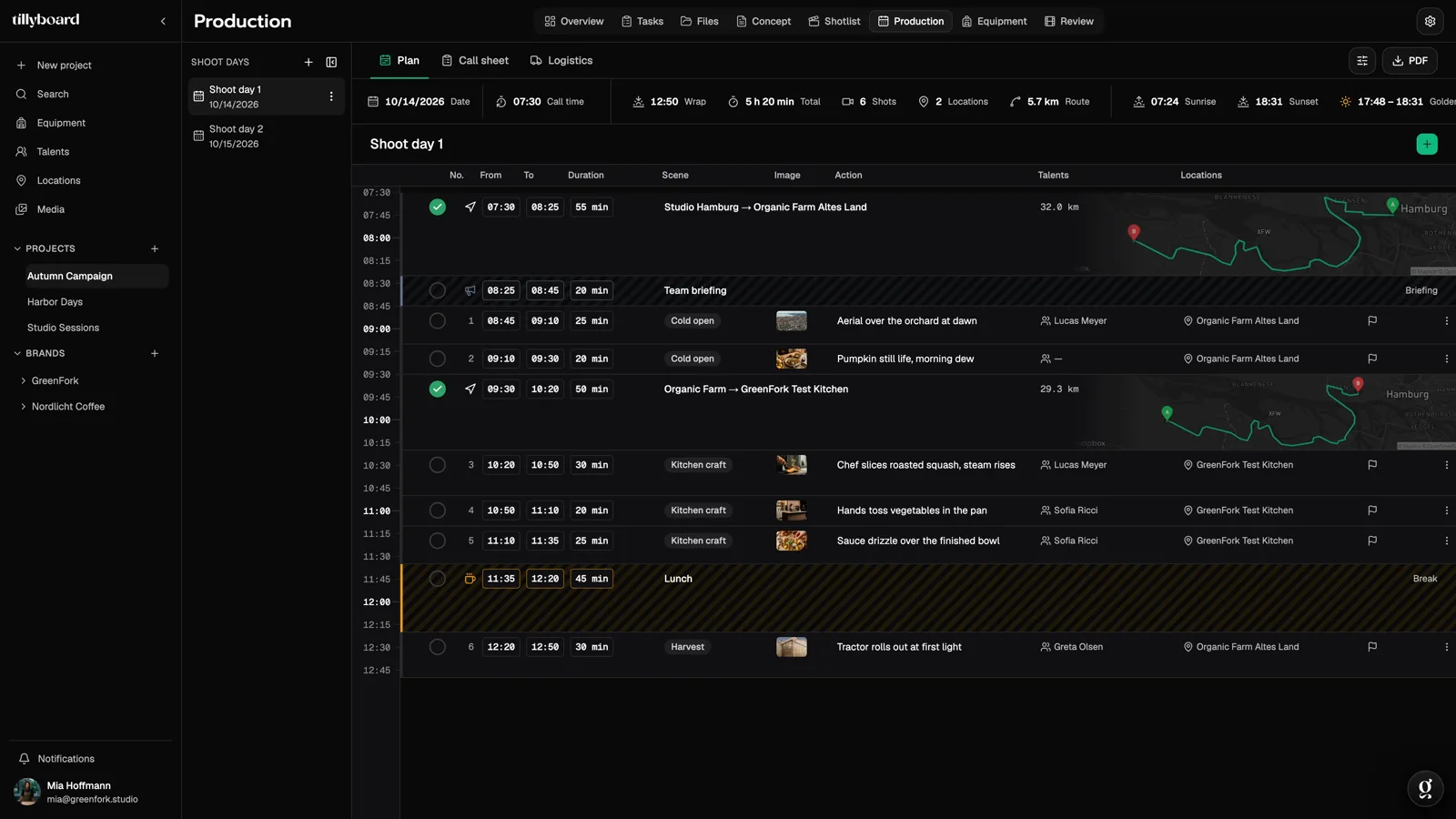
In the shooting schedule every shot carries its preview frame. When the AD reshuffles the day, everyone sees which picture is meant.
A day that holds up
Company moves with drive time, breaks and daylight sit in the same plan. The call sheet is built from that day.
In your pocket on set
Shot list, storyboard, schedule and call sheet are in the app for iPhone and iPad. What changes on set shows up in the office seconds later.
How to create a storyboard
Whether you use a pencil, a spreadsheet or TillyBoard, a good storyboard comes together in the same order.
1. Start with the brief, not with the first frame
Before you add a single frame, answer three questions: what should the viewer feel or do at the end, how long is the film, and in which format will it run? A 30-second TV spot, a 9:16 reel and a three-minute brand film need completely different boards.
2. Split the film into beats or segments
Divide the runtime into sections with their own time window, for example hook, product, moment and end line. Give each segment a target in seconds. That way you notice while writing whether the story fits the length, not in the edit.
3. Write one row per setup
For every shot, write down at least:
- Shot size: long shot, medium, close-up, extreme close-up. It decides how much of the world is in the frame.
- Action: one sentence on what happens. Short enough to read at a glance.
- Sound and on-screen text: dialogue, voice-over, music cue, overlaid line.
- Cast and location: who is in the shot and where it is filmed. The schedule needs this later.
- Duration: the seconds in the finished film, not the time spent on set.
4. Add the frames
Stick figures, a reference photo or a generated preview frame: the picture has to show framing, eyeline and mood. Watch continuity. If someone walks left to right in one shot, they should do the same in the next, or you cross the line.
5. Check length and order
Read the board once from start to finish as if it were the edit. Are segments running long? Is a transition missing? Does the product show up in time? Right now a change costs a minute; on the shoot day it costs an hour.
6. Get sign-off and carry it into the schedule
Send the board to the client and the crew and get sign-off before anything is booked. Then the shots are sorted into shoot days by location and light. In TillyBoard that is the same data; in a spreadsheet, this is where the retyping starts.
Tip: for social formats, give each cutdown its own segment. You’ll see right away whether the 6-second version is made of shots that are already on the board.
Who it’s for
For teams whose projects start with a brief rather than a finished screenplay.
Commercials
Every second is sold. Segments with targets show whether hook, product and end line fit into 20 or 30 seconds.
Brand films
Longer stories across several locations. The board keeps look and order together, with the moodboard in the same project.
Social content
Many short formats from one shoot. One segment per cutdown, each adding up its own length.
Corporate video
Interviews, b-roll and product shots that need internal sign-off. The PDF goes to everyone who doesn’t have an account.
Film schools and students
Learn storyboard, shot list and schedule in one place. The free plan covers one project of your own.
Agencies and in-house teams
Several projects and brands at once. Director, camera and producer work at the same time, with roles and permissions.
TillyBoard, Boords and StudioBinder compared
All three are good tools with a different focus. The table only lists points you can check yourself on the vendors’ websites.
| Criterion | TillyBoard | Boords | StudioBinder |
|---|---|---|---|
| Focus | Pre-production from concept to approval: shot list, storyboard, schedule, call sheet, equipment, review | Storyboards, scripts and animatics with client review | Production management with shot lists, storyboards, schedules and call sheets |
| Runs in the browser | Yes, plus apps for iPhone and iPad | Yes | Yes |
| Free tier | Free plan: 1 own project, 10 AI images per month, no credit card | Free plan: 5 active storyboards, 8 one-off AI image credits, no credit card | Free account available |
| Paid plans from | €22 per month (€19 billed annually), excl. VAT | $39 per month (Solo) | See the vendor’s website |
| AI images for frames | Yes, from the shot’s action text; 10 to 200 per month depending on plan | Yes, 250 to 3,000 per month on paid plans | Image editor for uploaded images, including AI-generated ones |
| Client feedback without an account | Yes, review and approval for videos and stills | Yes, no-signup client reviews | View-only share links, comments by invited collaborators |
| Schedule and call sheet in the same tool | Yes, from the same shots | Not listed on the pricing page | Yes |
As of October 2026. Boords details from boords.com/pricing, StudioBinder details from studiobinder.com (Storyboard Creator, Call Sheet Software). Prices and features may change. All trademarks belong to their respective owners.
From teams planning with TillyBoard
“We finally have a structured workflow for our social media videos. From the first idea to the shoot, everyone knows what’s coming up.”
“We plan everything in TillyBoard, from the first idea to the call sheet. One tool instead of three.”
Storyboard software FAQ
What is storyboard software?
A program in which you plan a film frame by frame before the shoot: which setup comes when, what happens in it and how long it runs. In TillyBoard the storyboard is part of the shot list. Every shot has a preview frame, and the same shots flow into the schedule and the call sheet.
Can I create a storyboard without drawing?
Yes. Select the shots and click Generate images. Each preview frame is built from the shot’s action text. It shows framing and mood and serves as a reference for the crew.
Is the storyboard linked to the shot list?
It is the same data. Creatives, Timeline and Script show the same shots. What you change in one view shows up in the others and later in the shooting schedule.
Do the preview frames use my cast and locations?
Only if you tick the option. Then talent headshots and location photos go into the generation as references.
How many AI images are included?
10 per month on Free, 50 on Creator, 100 on Studio and 200 on Team, more on Enterprise. The quota resets monthly. Planning and projects keep working when it is used up.
How does the storyboard get to the client and the crew?
As a PDF export or as an image export for boards and frames. Custom branding on exports is included from the Team plan up. Whoever plans with you works right in the project, with roles and permissions.
Is there a storyboard app for iPhone and iPad?
Yes. TillyBoard runs in the browser with no install and as an app for iPhone and iPad, with shot list, storyboard, schedule and call sheet. Everything syncs automatically.
Can I use TillyBoard for free?
Yes. The Free plan is free forever and needs no credit card: one own project, 1 GB of storage and 10 AI images per month. Paid plans start at €22 per month excl. VAT and can be cancelled monthly.
Your next storyboard, done tonight
Create a project, write the shots and let the frames come together. The free plan covers your first board.
Further reading
Shot list software
The shot list behind the storyboard: runtime per segment, cast and locations.
Concept and moodboard
Treatment, moodboard and brief before the first shot exists.
Storyboard template
Structure, how to fill it in and common mistakes.
Guide: build a storyboard
Step by step from the brief to the board.
Storyboards for social formats
Planning vertical video, hooks and cutdowns.
Shoot day planner
From script length to a first list of setups and a shoot day.
Formats & deliverables
What survives 9:16, 4:5 and 2.39 of your frame.
Boords alternatives
Which tools are worth a look and for what.
TillyBoard and StudioBinder
Where the two differ.
Shooting schedule software
From the board to the shoot day, with daylight and drive times.
Call sheet software
The call sheet straight from the schedule.
Shot list template
The columns every shot list needs.