Pre-production software
Pre-production software that carries you from brief to shoot day.
TillyBoard keeps the whole of pre-production in one project: concept and moodboard, a shot list with preview frames, shoot days with daylight and weather, the call sheet built from the plan and the packing list drawn from your inventory. Change a shot, and the schedule, call sheet and packing list follow.
- Free plan, no card
- Browser, iPhone, iPad, Apple Watch
- German and English
Teams shooting for these brands plan with TillyBoard





Why pre-production so often falls apart into five files
The treatment lives in Google Docs, the references on a Pinterest board, the shot list in Excel, the schedule in a second spreadsheet, the call sheet in a Word file and the gear list with the camera assistant. Every change has to be carried into every file by hand. That is exactly where the mistakes on the shoot day begin.
One project instead of five files
Concept, shot list, shoot days, call sheets, packing lists and review hang off the same project. Talents and locations are set up once and picked everywhere after that.
Change it once, the rest follows
When the shot list changes, the schedule, call sheet and packing list follow. Nobody reconciles three spreadsheets by hand.
Tilly AI writes the first draft
Tilly AI knows the workflow and the brand context. It proposes, you decide. Single shots can be regenerated without touching the rest.
From brief to shoot day in six steps
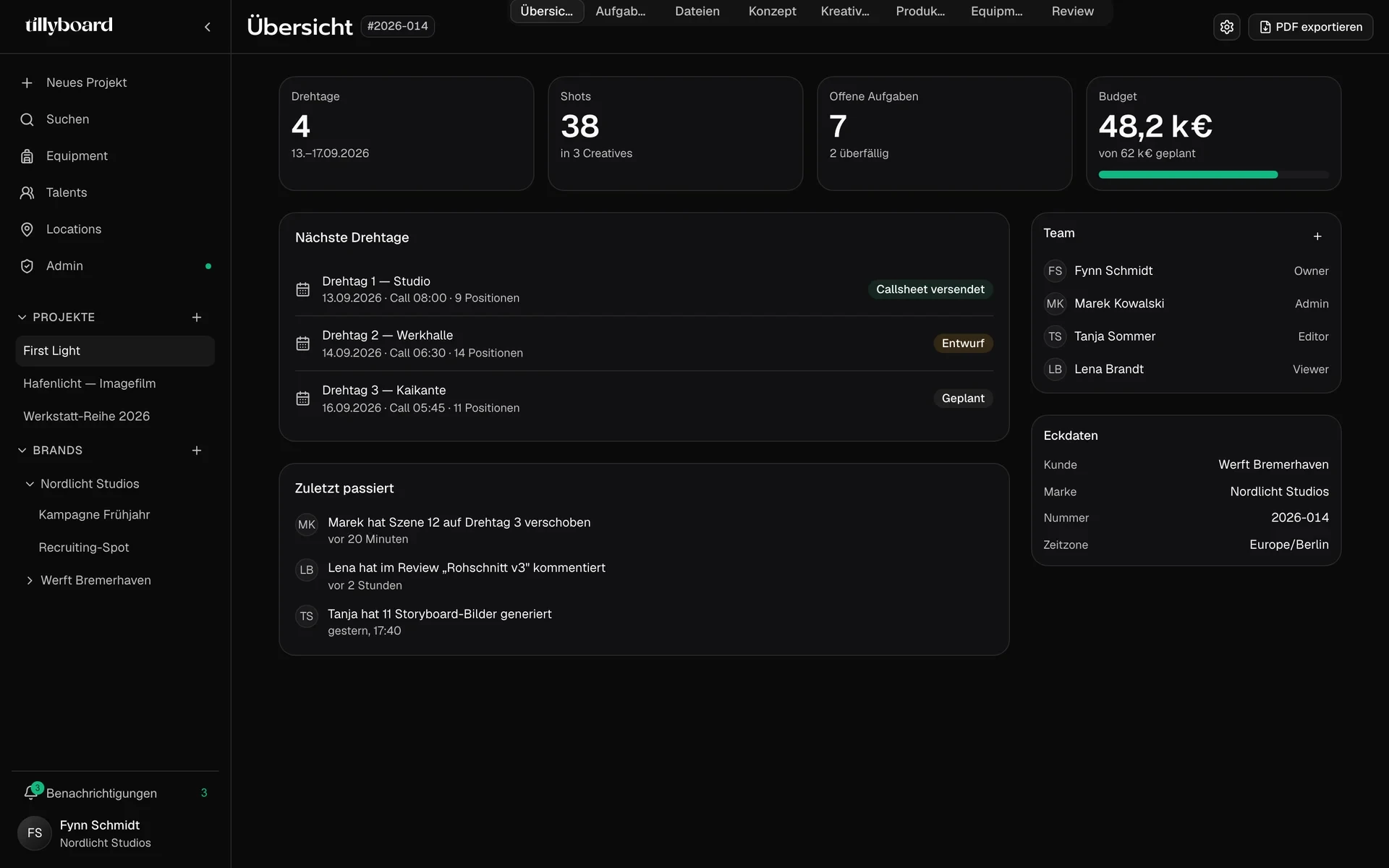
This is how a commercial, a brand film or a social campaign runs through TillyBoard. Every image is a capture from the real app.
-
01
Brief in, concept out
The treatment is a document with headings, lists, to-dos, quotes, tables, images and PDFs. Beats get a time window, open points like the drone permit sit as a checkbox right underneath.
On request, Tilly AI develops a concept idea, summarises the active concept or sharpens the core message and target audience.
More about concept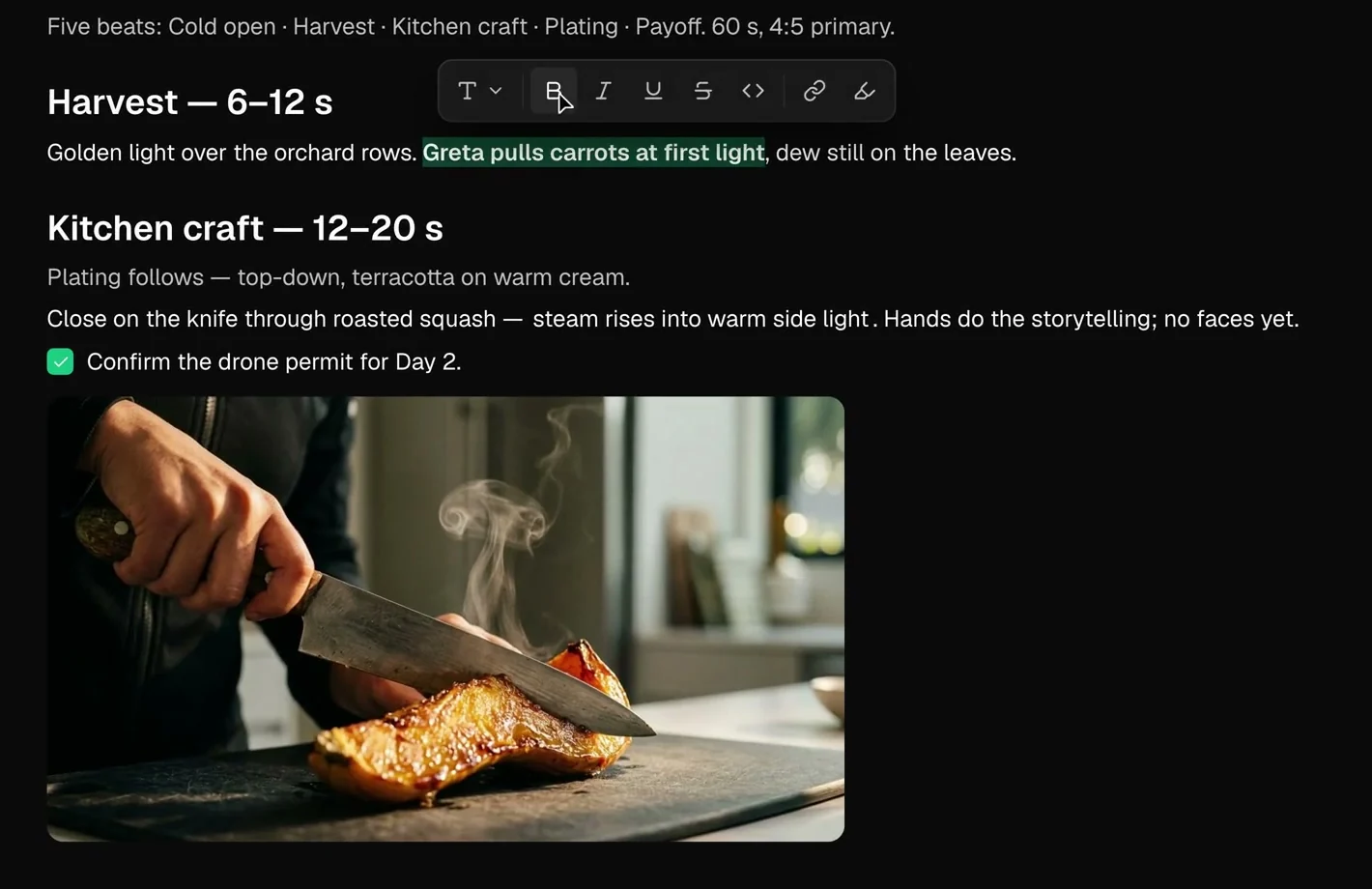
-
02
Put the look on one wall
The moodboard is an open canvas for stills, locations, sticky notes and connecting lines. Several people work on it at once, each one sees the others by name at their cursor.
See the moodboard tool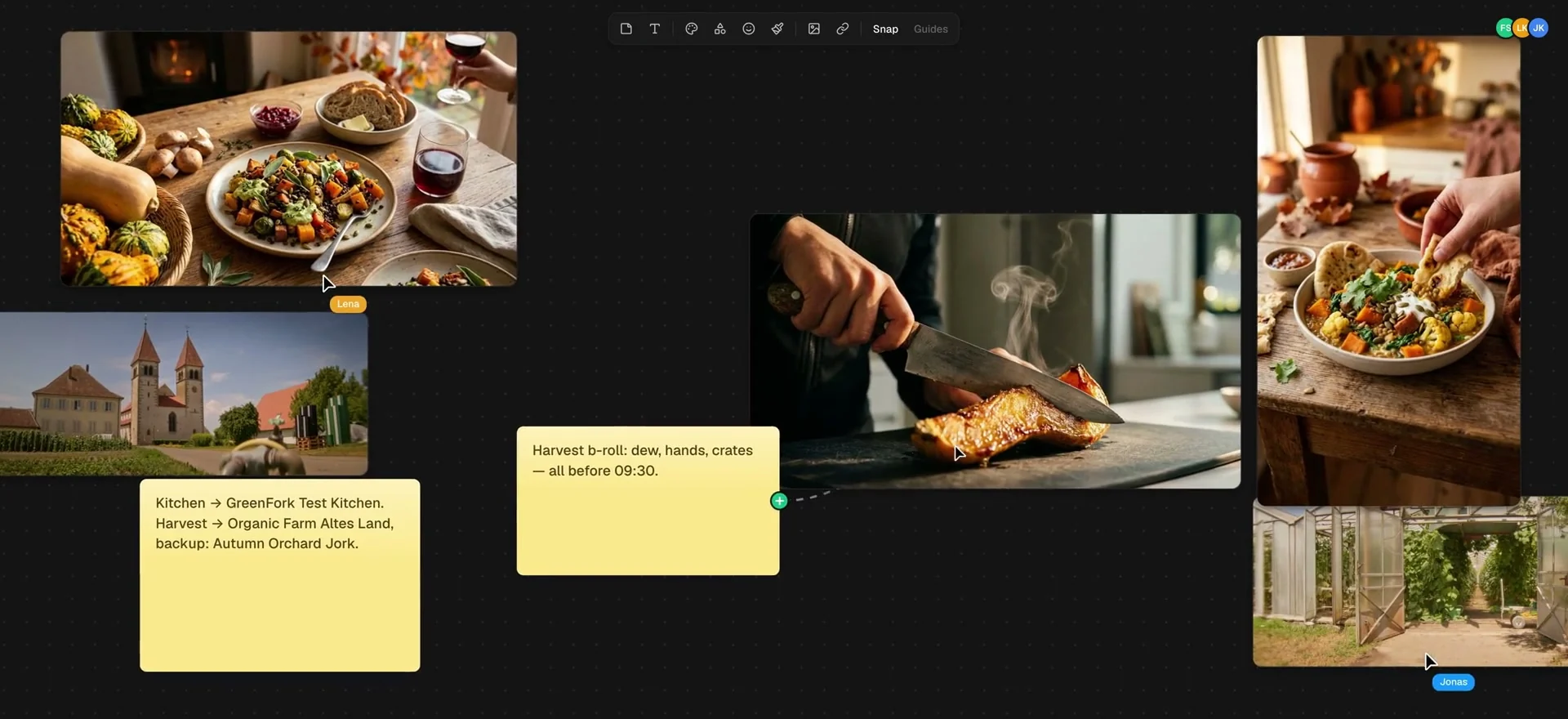
-
03
The shot list that adds up
One row per shot with action, on-screen text, sound, cast, location, duration and a preview frame. Segments add up their runtime against the target. When one runs over, its counter turns red, long before anyone notices in the edit.
Preview frames are generated from the action text. Tick the option and talent headshots and location photos go in as references.
More about the shot list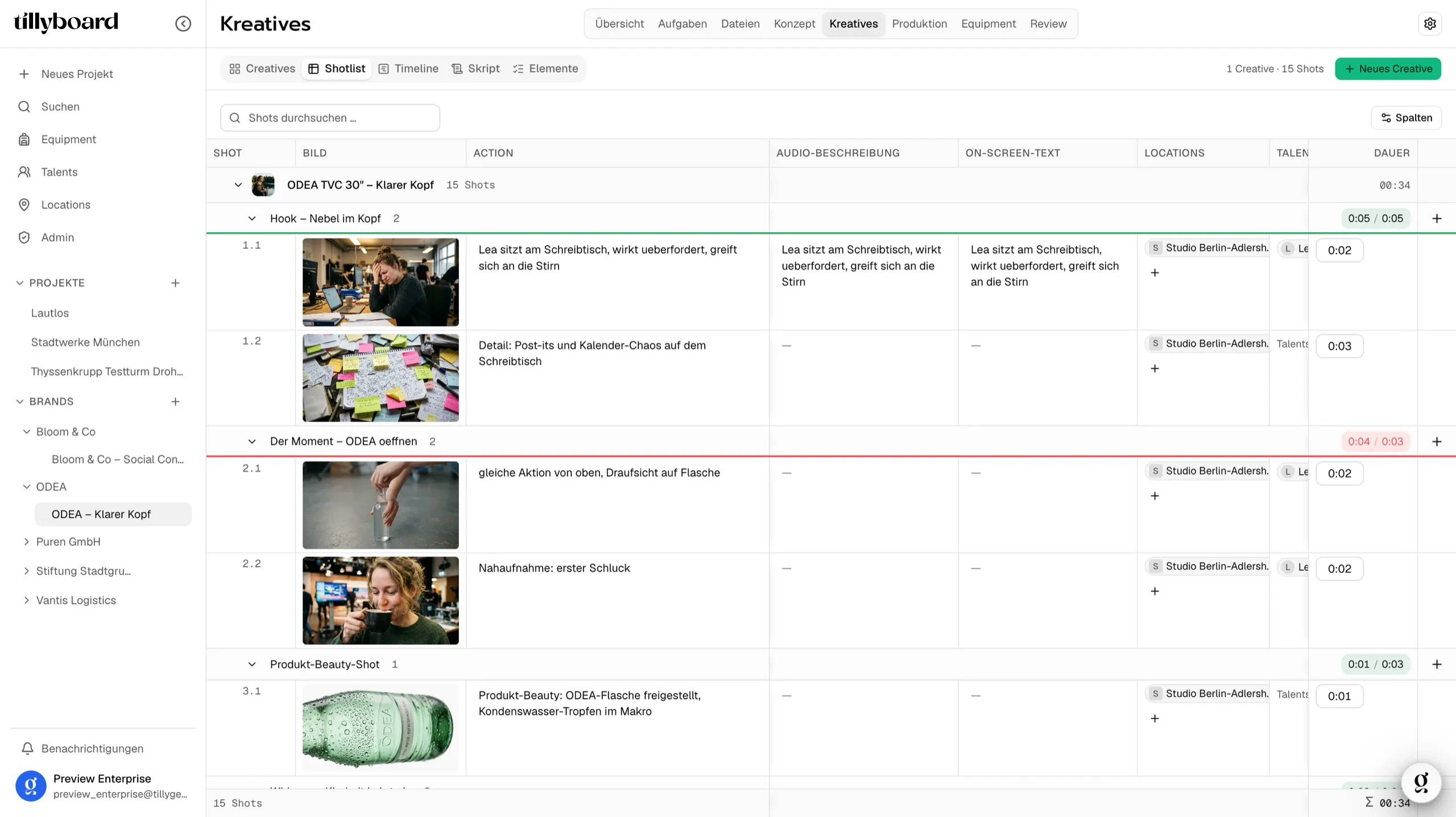
-
04
Tasks that don't end up in the inbox
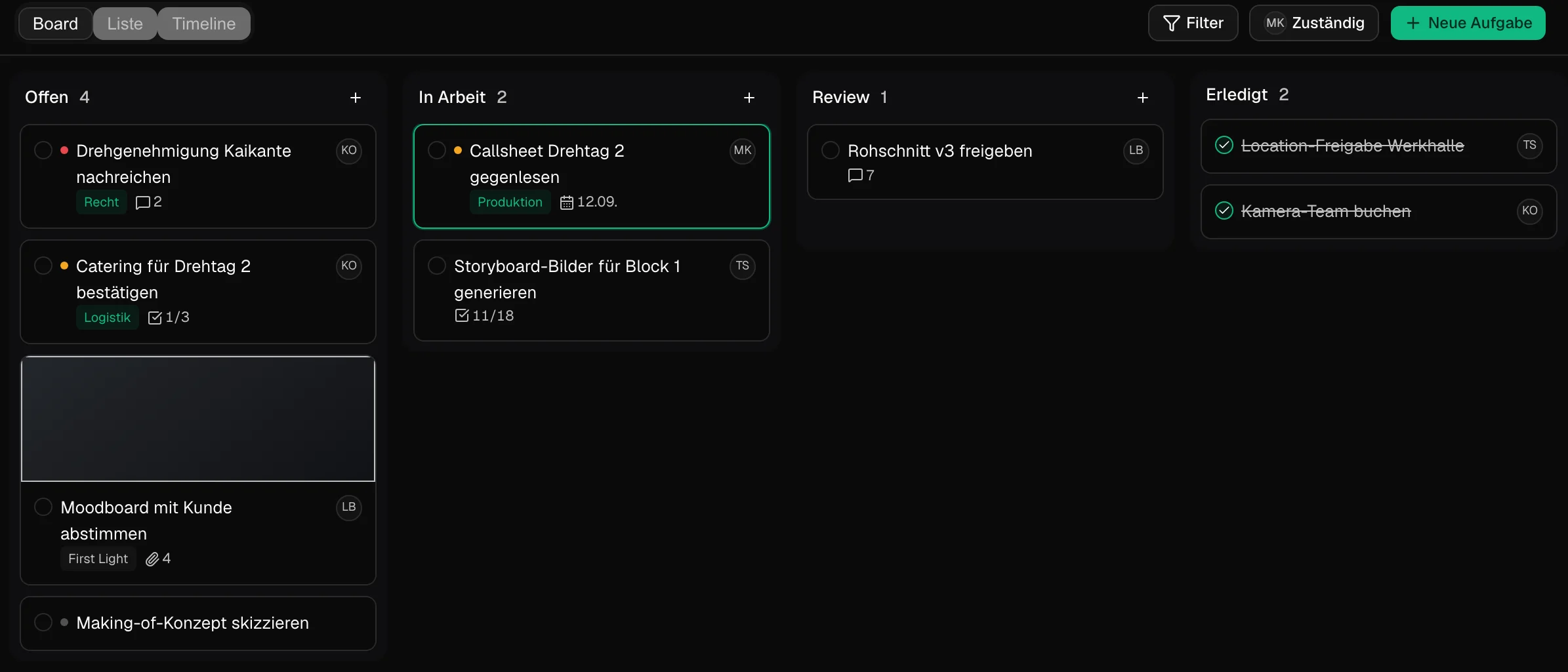
Filming permit, catering for shoot day 2, proofreading the call sheet: every task belongs to the project and moves across the board from Open to Done. The start page shows your tasks for today, each with the project it belongs to.
-
05
Shoot days that hold up
The shoot day is made of blocks: shots, company moves with drive time and breaks, each with its own time slot. Above the plan sit sunrise, sunset, golden hour, temperature, chance of rain and wind for the location. Drag a shot to a new slot and the times after it recalculate.
See the shooting schedule software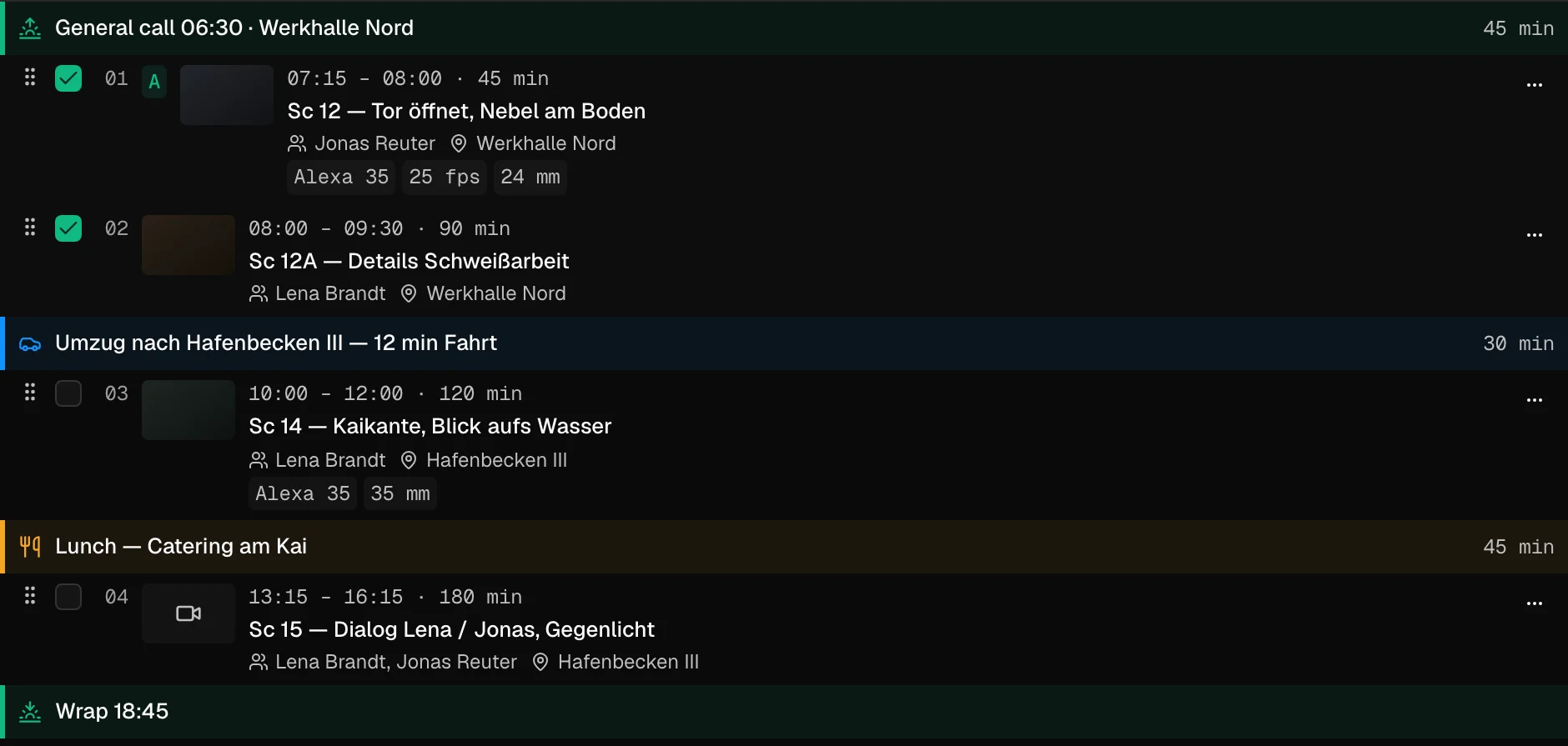
-
06
Call sheet and packing list from the same plan
The call sheet is built from the shoot day: times, locations with parking, contact and permit reference, the nearest hospital, running order, cast and crew with their calls. You send it by e-mail, cast and crew confirm via link, without an account.
Packing lists draw on your inventory. When a piece is planned for two parallel productions, Tilly AI warns you before the kit leaves the office.
See the call sheet software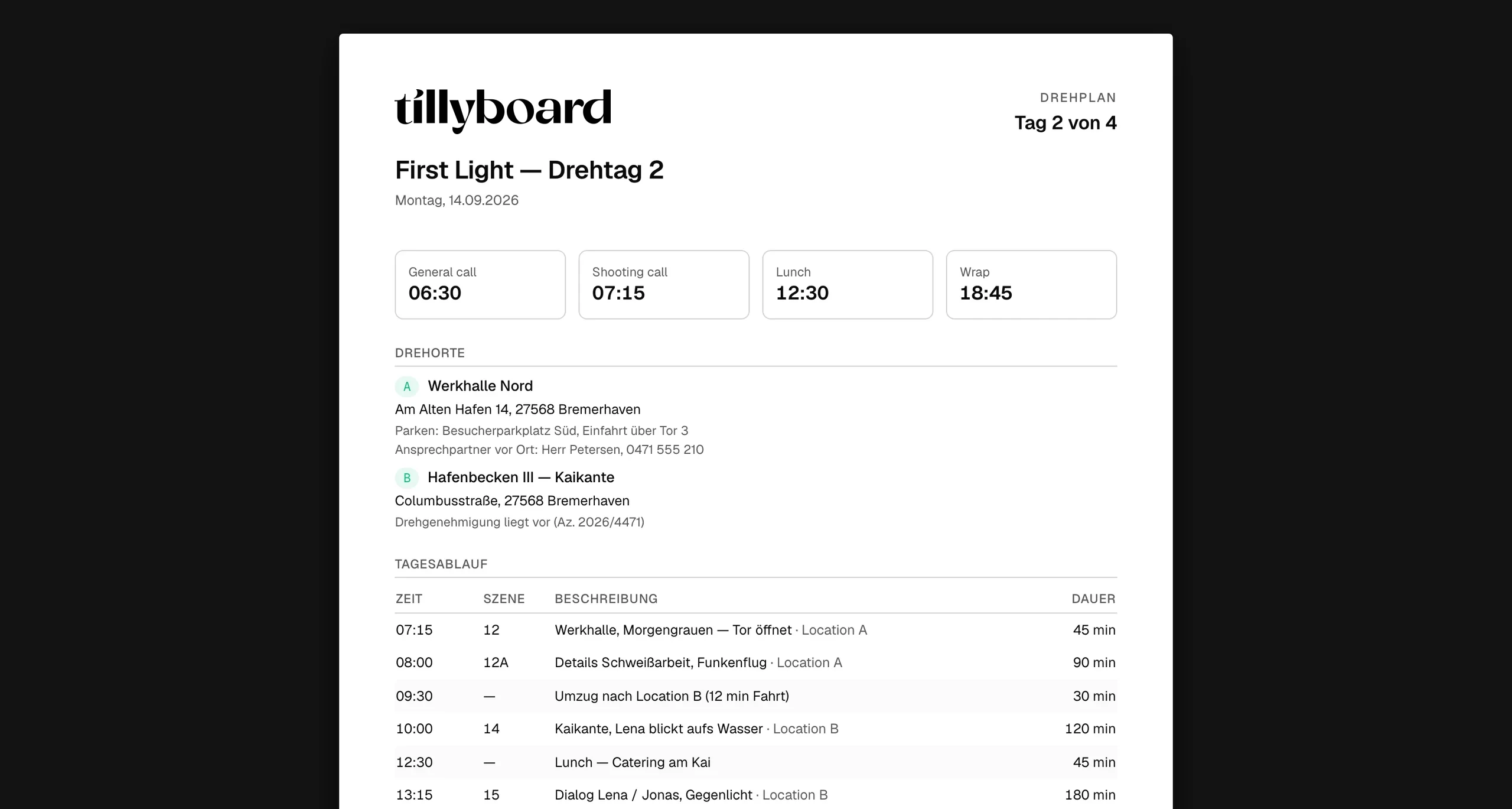
Everything pre-production needs
These are the building blocks inside every TillyBoard project. The free plan includes all of them.
Concept & moodboard
Treatment as a document, moodboard as an open canvas, several concepts per project and a PDF export for the client.
Shot list & storyboard
The same shots as a list, creatives, timeline or script, with a preview frame per shot. Not a copy, one source.
Talents & locations
Talents with type, age, home base, languages and day rate. Locations with category, address, crew size and day rate, as a table or on a map.
Schedule & call sheet
Shoot days in blocks, daylight and weather, call sheet by e-mail, confirmation via link, export as PDF and as CSV for scheduling software.
Equipment & packing lists
One inventory with inventory number, storage location, status and day rate. Packing lists per shoot, ticked off in the browser or offline on the iPhone.
Review & approval
The client comments on the timecode, draws into the frame, approves and downloads the finished video straight from you.
Who this pre-production software is built for
TillyBoard is built for commercials, brand films, social content and documentary work, the productions where concept, client and shoot day are tightly linked.
Production companies
Several jobs side by side, one inventory. Every project carries its own concept, shoot days and packing lists, and double bookings show up before the truck is loaded.
Agencies
Store each brand's CI, tone, audience and no-gos once. Every new creative sticks to them, and the client approves in the review without seeing the rest of the project.
In-house video teams
Recurring formats, social cutdowns and campaigns in one workspace. Roles from owner to viewer, so colleagues from marketing and communications can follow along.
Creators & solo shooters
Shot list and day plan on the iPhone, call times on the Apple Watch. The Creator plan adds unlimited projects and 100 GB of storage.
Film schools
Students learn the sequence of real pre-production: treatment, coverage, schedule, call sheet. The free plan covers one project of your own.
TillyBoard compared with other pre-production software
StudioBinder, Yamdu and Celtx are established tools with their own strengths. The table only compares what the providers list as features on their websites. As of October 2026.
| Feature | TillyBoard | StudioBinder | Yamdu | Celtx |
|---|---|---|---|---|
| Moodboard | ✓ open canvas with live cursors | ✓ | – | – |
| Shot list | ✓ with runtime per segment | ✓ | – | ✓ |
| Storyboard | ✓ AI preview frame per shot | ✓ | – | ✓ |
| Script breakdown / stripboard | – | ✓ | ✓ | ✓ |
| Shooting schedule | ✓ with daylight and weather | ✓ | ✓ | ✓ |
| Call sheets | ✓ sending and confirmation via link | ✓ | ✓ | ✓ |
| Budgeting | On the Enterprise plan | – | ✓ | ✓ |
| Equipment inventory & packing lists | ✓ | – | – | – |
| Video review with timecode notes | ✓ | – | – | – |
| Free option | ✓ Free plan, no time limit | ✓ “Start for free” | – | ✓ free account |
Where TillyBoard doesn't fit: if you schedule a feature film straight from the screenplay with script breakdown, stripboard and day-out-of-days, tools specialised in that, such as Yamdu, StudioBinder or Movie Magic Scheduling, serve you better. TillyBoard is built for commercials, brand films and social content.
What belongs in pre-production? The checklist
Pre-production is everything between winning the job and the first shoot day. For a 30-second spot that's often just two weeks, for a brand film a few months. The items are always the same.
01Brief & concept
- Brief with goal, audience, channels and delivery formats
- Core message in one sentence
- Treatment with beats and time windows
- Moodboard for light, colour, props and locations
- Client sign-off on the concept
02Coverage & storyboard
- Shot list with shot size, movement and lens
- Runtime per segment checked against the target
- Storyboard or preview frames for the key shots
- Social cutdowns planned in from the start
03Cast, crew & locations
- Casting and booking the talents
- Crew with roles and day rates
- Location scouting and tech recce
- Filming permits and location releases
- Appearance releases
04Schedule
- Number of shoot days estimated
- Order by location, light and availability
- Company moves with drive time, breaks and buffer
- Weather backup for exteriors
05Equipment & logistics
- Camera package, lighting and sound decided
- Packing list per cart or department
- Double bookings across parallel jobs checked
- Catering, travel and accommodation
06Call sheet & final sign-offs
- Call sheet with times, addresses and emergency contacts
- Confirmation from cast and crew
- Risk assessment and safety briefing
- Client sign-off before the shoot
How long does pre-production take?
It depends on the format: a social spot is sometimes prepped in days, a brand film with several locations in months. In advertising time often gets tight because the air date is fixed. That's exactly when it pays off to keep concept, shot list and schedule in one place: a late client change then costs one row instead of an afternoon.
Which software do you need for pre-production?
Small teams get by for a long time with docs, spreadsheets and a Pinterest board. The break comes as soon as several people plan at once, the client has a say or two jobs need the same gear. That's when pre-production software pays off, with every document coming from the same source. Check three things in any tool: can the crew confirm without an account? Does the call sheet follow the schedule automatically? And does everything come out as a PDF at the end?
From teams planning with TillyBoard
“We finally have a structured workflow for our social media videos. From the first idea to the shoot, everyone knows what’s coming up.”
“We plan everything in TillyBoard, from the first idea to the call sheet. One tool instead of three.”
Pre-production software: frequently asked questions
What is pre-production software?
Pre-production software brings together the planning before the shoot: concept, moodboard, shot list, storyboard, schedule, call sheet and equipment. In TillyBoard all of these hang off one project, so changes to the shot list reach the schedule, the call sheet and the packing list.
Is TillyBoard free?
There's a free plan with no time limit and no credit card, with 1 GB of storage, one project of your own and 10 AI images per month. The paid plans Creator, Studio and Team cost €22, €39 and €109 per month on monthly billing, excl. VAT, and less when billed annually. Enterprise is priced individually.
Which productions is TillyBoard suited for?
For commercials, brand films, social content, music videos and documentary work. For feature films scheduled from the screenplay with a stripboard and day-out-of-days, specialised tools are a better fit.
What does Tilly AI do in pre-production?
Tilly AI writes first drafts: a concept idea, a summary, a sharpened core message. It knows the stored brand guidelines, generates preview frames for shots and warns about double-booked equipment. The decisions stay with you.
Do the crew and the client need an account?
No. Cast and crew confirm the call sheet via link. Clients review and approve inside the project without seeing the schedule or the packing list. Whoever plans with you works in the same project with roles and permissions.
Is there an app for the shoot day?
Yes. TillyBoard runs in the browser with no install, on the iPhone with the day plan and call sheet, on the iPad with Apple Pencil and on the Apple Watch with call times. Packing lists can be ticked off in the iOS app offline too.
Can I plan budgets in TillyBoard?
Budgets, crew planning, time tracking as well as hotels, travel and catering are part of production planning on the Enterprise plan. The other plans don't include budgeting.
How do I get the plans out of TillyBoard?
Call sheet, schedule, concept, shot list and packing list are available as PDFs, the schedule also as CSV for scheduling software and packing lists as a carnet CSV for customs. You can cancel monthly.
Plan your next shoot in one project.
Write the brief tonight. Tomorrow the concept, the shot list and the first shoot day are in place.
Start for free Free plan · no card · cancel monthlyFurther reading
Film production software
Which software helps in which phase of a film production.
SoftwareStoryboard software
Preview frames per shot, straight from the shot list.
TemplateShot list template
The columns every shot list needs.
TemplateCreative brief template
So the concept stands on a clear brief.
How-toWrite a video brief
What goes into a brief before planning starts.
ToolShoot day planner
Whether your setups fit the shoot day — as a timeline.
OverviewAll templates
Call sheets, schedules, checklists and more.
OverviewAll tools
Light, shoot day, budget, data and more.
OverviewSoftware comparisons
Production software side by side.