Film production software
Film production software that holds every job together.
TillyBoard is production management for commercials, brand films and social content: every production is its own project with concept, shot list, shoot days, call sheets, packing lists and client review. All projects draw on the same inventory, and the start page shows where every job stands.
- Free plan, no card
- Crew and clients without an account
- iPhone app for the shoot day
Teams shooting for these brands plan with TillyBoard





See how a production comes together
Just under 30 seconds from the real app, from brief to set: moodboard and Tilly AI, the shot list, tasks on the board and on the iPhone, then the shoot day itself.
The phases of a film production and which software does what
No single piece of software covers a film production from the first idea to distribution. If you know which phase needs which tool, you buy less twice and copy less by hand.
-
01
Development
What happensIdea, brief, pitch, quote. In advertising the brief comes from the client or the agency, in fiction the screenplay is written.
Which softwareWord processors and decks for pitch and quote, screenwriting programs like Final Draft or Celtx for fiction. In TillyBoard this is where the concept starts, with treatment and moodboard.
-
02
Pre-production
What happensCoverage, storyboard, casting, locations, permits, crew, equipment and the schedule. The most labour-intensive phase, where most documents are created.
Which softwarePre-production software like TillyBoard for shot list, storyboard, schedule, call sheet and packing lists. For features with script breakdown and stripboard, rather Yamdu, StudioBinder or Movie Magic Scheduling.
-
03
Production
What happensThe shoot days themselves. Holding the schedule, company moves, weather, last-minute changes, ticking off gear.
Which softwareAn app on the phone with the day plan and call sheet. In TillyBoard that's the iPhone app with the day plan, call times on the Apple Watch and packing lists ticked off offline.
-
04
Post-production
What happensEdit, colour, sound, graphics, revision rounds with the client and the approval.
Which softwareEditing software like Premiere Pro, DaVinci Resolve or Avid Media Composer. TillyBoard doesn't edit, but it handles the client review with timecode notes, versions and approval.
-
05
Delivery
What happensMasters, cutdowns and formats for every platform, handover to the client, archiving.
Which softwareEncoders and storage. In TillyBoard the client downloads the approved video straight from the project, and on the Enterprise plan the whole project can be exported as a ZIP.
Production management from brief to shoot day
This is what production management looks like in TillyBoard when several jobs run at once. Every image is a capture from the real app.
-
01
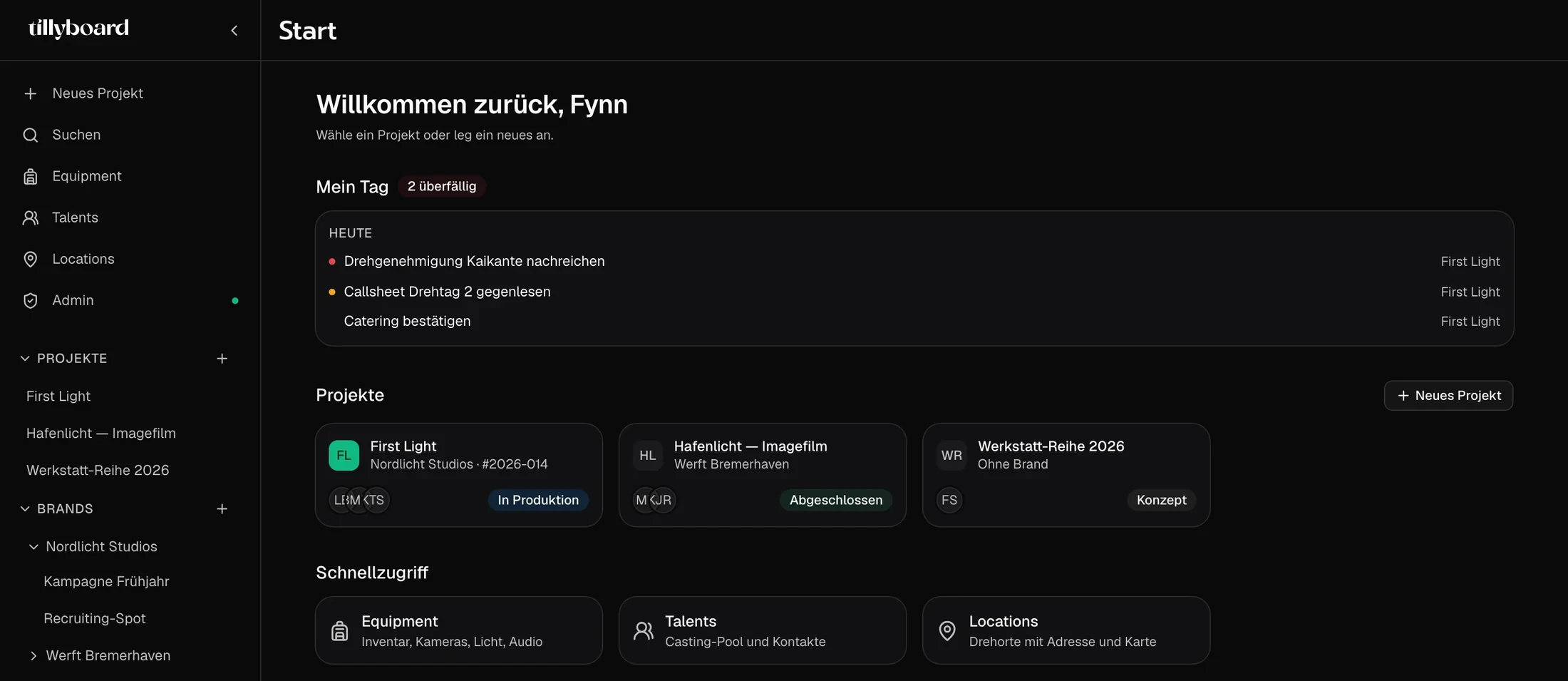
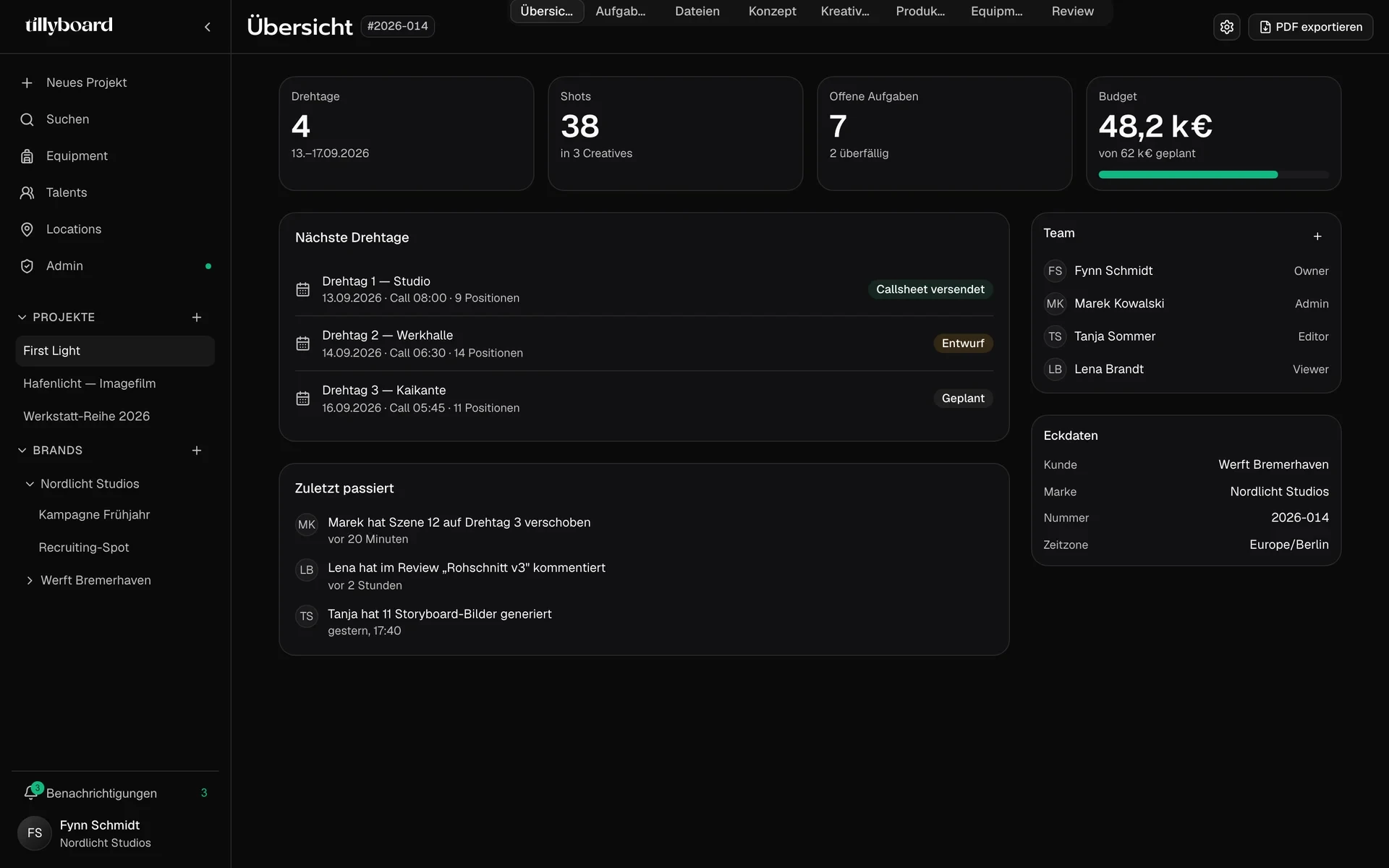
Every job at a glance
The project overview shows shoot days, shots, open tasks and the next shoot days with call sheet status. Plus the team with roles from owner to viewer, client and brand.
-
02
From concept to shot list
Treatment and moodboard live in the project, each concept with its own shots. The shot list adds up the runtime per segment against the target and generates preview frames from the action text.
See the pre-production software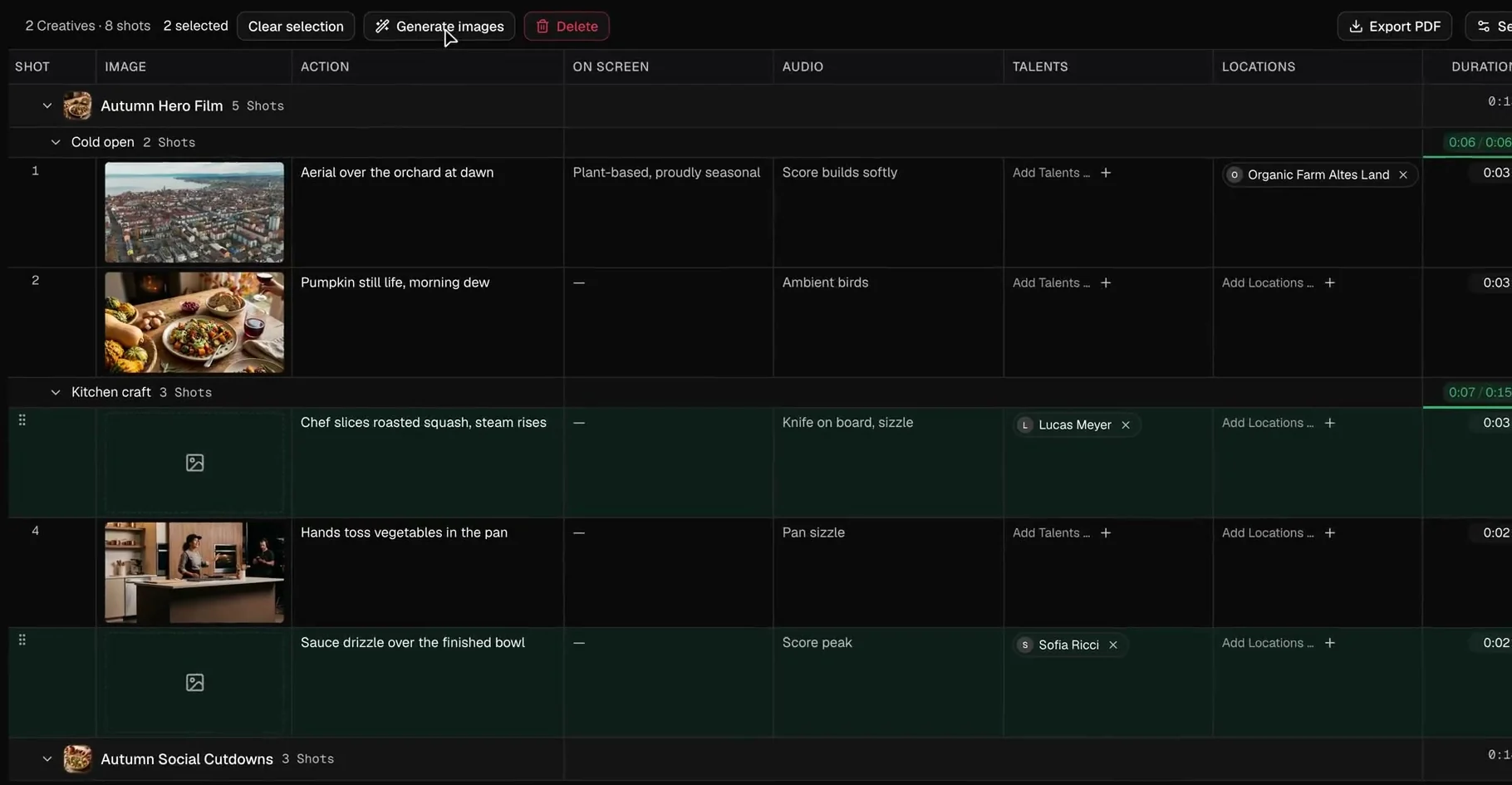
-
03
Shoot days built from blocks, not cells
Every shoot day is its own plan. Shots, company moves with drive time and breaks get their time slot, elements move between days by drag and drop. A line marks the current time and shows whether you're on schedule.
See the shooting schedule software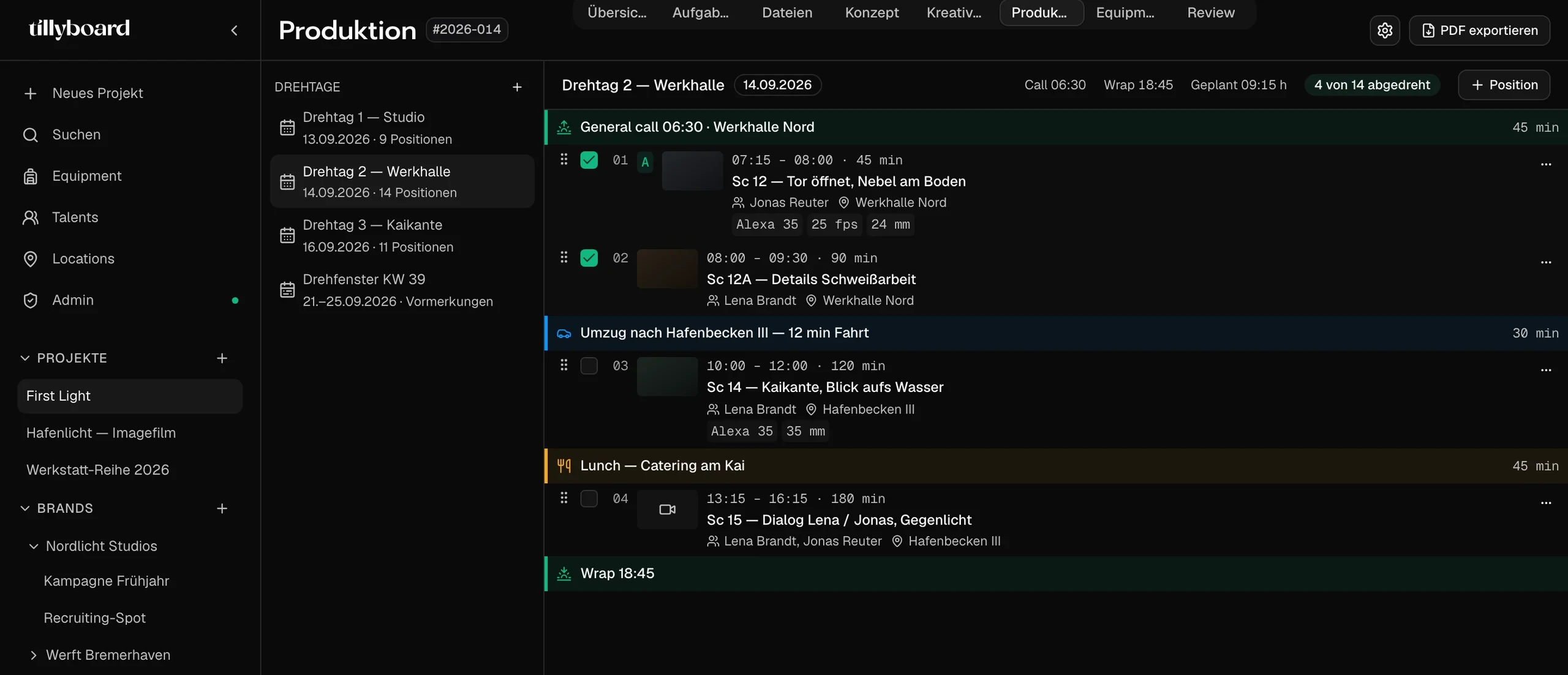
-
04
One kit room for every production
The inventory carries every item with inventory number, storage location, status and day rate. Hired gear stays marked as hired. Every packing list counts its conflicts, and Tilly AI warns when the same piece is planned for parallel productions.
More about equipment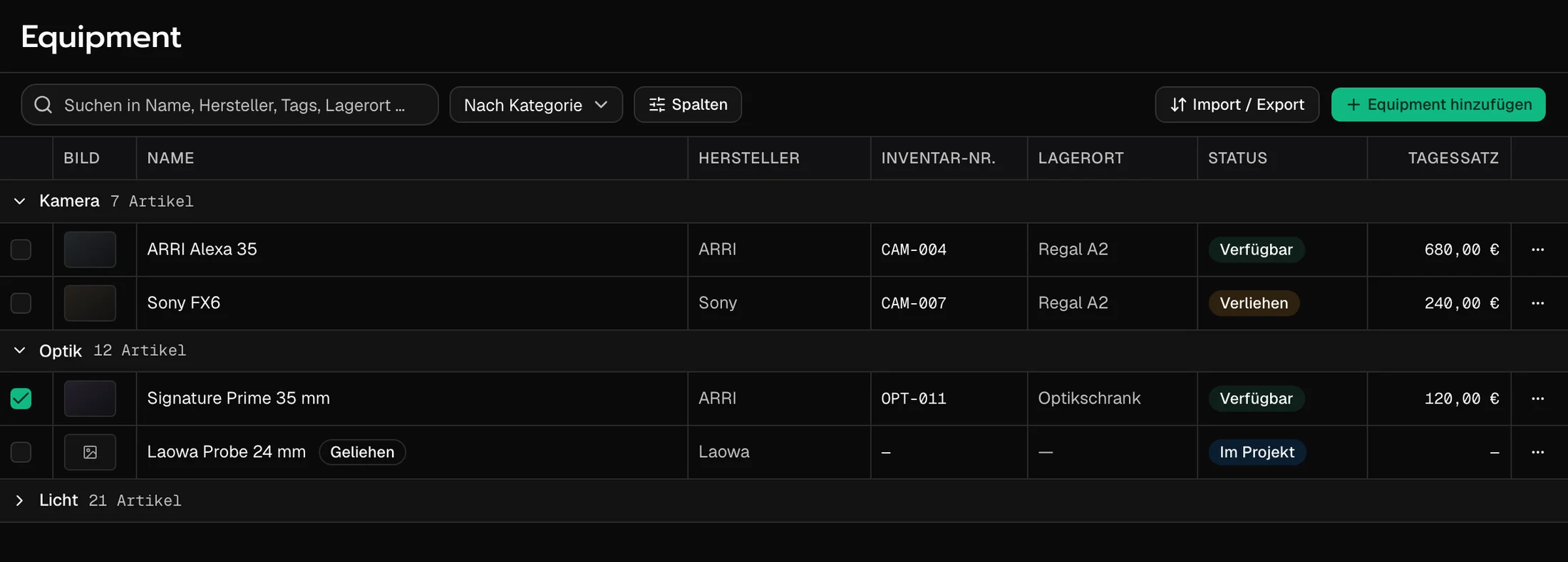
-
05
Client notes on the frame, not in the inbox
Rough cuts and stills sit in folders, each file with a status: in review, changes requested, approved. The client comments on the timecode, draws into the frame and approves with one click, without an account and without seeing the rest of the project.
More about review & approval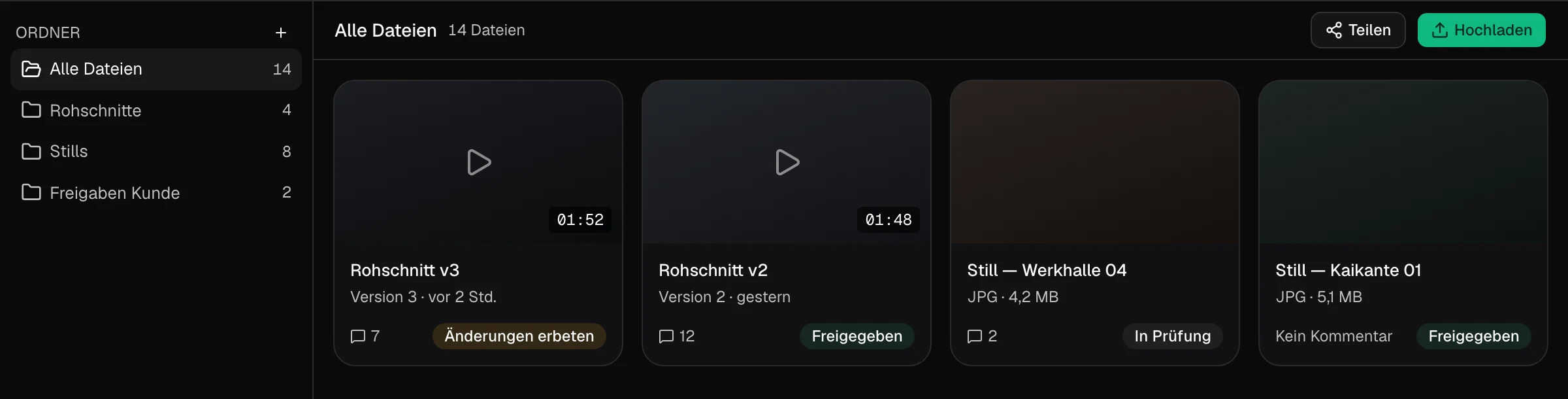
When crew, budget and logistics come in
Larger production companies and agencies need more than a shot list and a schedule. These features are part of the Enterprise plan.
Crew, hours, budgets
Crew planning, time tracking and budgets per production.
Shoot logistics
Hotels, travel, catering and dietary restrictions per person.
EU hosting with Tilly Terra
All AI features hosted in the EU, processed in line with the GDPR, never used for training.
White label
Clients work in a workspace with your logo and colours. White label is a paid Enterprise add-on.
REST API
Connects TillyBoard to the systems you already run on.
Framework agreements
Annual and framework agreements, the highest AI quotas and extra storage.
Who this film production software is made for
Production companies
One job in prep, the next one shooting, another in the edit. Every job has its project, all share one inventory and one start page.
Agencies
Store brands with their guidelines, sort projects by client, collect approvals in the review instead of by e-mail.
In-house teams
Corporate video production with recurring formats. Colleagues without a film background follow along with viewer rights.
Creators
Shooting alone or as a pair and still having a clean plan: shot list, day plan on the iPhone, packing list offline.
Film schools
The whole course of a production in one tool, from treatment to approval. The free plan is enough to get started.
Producers and production managers
Tasks with status, shoot days with call sheets, confirmations from cast and crew flowing back into the project.
TillyBoard, StudioBinder, Yamdu or a spreadsheet?
The comparison only shows what the providers list as features on their websites. As of October 2026.
| Feature | TillyBoard | StudioBinder | Yamdu | Excel / Google Sheets |
|---|---|---|---|---|
| Task board | ✓ | ✓ | – | By hand |
| Moodboard & shot list | ✓ | ✓ | – | By hand |
| Script breakdown / stripboard | – | ✓ | ✓ | By hand |
| Shooting schedule | ✓ with daylight and weather | ✓ | ✓ | By hand |
| Call sheets with distribution | ✓ | ✓ | ✓ | – |
| Cast & crew | ✓ talents; crew planning on Enterprise | ✓ contacts | ✓ | By hand |
| Budgeting | On the Enterprise plan | – | ✓ | By hand |
| Equipment inventory & packing lists | ✓ | – | – | By hand |
| Video review with timecode notes | ✓ | – | – | – |
| German interface | ✓ | – | ✓ | ✓ |
To be honest: for feature films and series scheduled from the screenplay and needing cost reports, Yamdu is better equipped. StudioBinder also covers screenwriting and stripboards. TillyBoard is strongest in commercials, brand films and social content, where concept, equipment and client approval belong together.
From teams planning with TillyBoard
“We plan everything in TillyBoard, from the first idea to the call sheet. One tool instead of three.”
“We finally have a structured workflow for our social media videos. From the first idea to the shoot, everyone knows what’s coming up.”
Film production software: frequently asked questions
What is film production management software?
Film production management software organises everything around a production: projects, tasks, shot lists, schedules, call sheets, cast, crew, equipment and approvals. TillyBoard focuses on pre-production, the shoot day and client review. Editing and accounting run in their own programs.
Can I plan several productions at the same time?
Yes. Every production is its own project with concept, creatives, shoot days, packing lists and review. The start page shows all projects with their client and status. From the Creator plan up, projects are unlimited.
Does TillyBoard work for corporate video production too?
Yes. In-house teams plan recurring formats, campaigns and social cutdowns in one workspace. The Studio plan allows up to 25 workspace members, the Team plan an unlimited number.
Does TillyBoard include budgeting?
Budgets are part of production planning on the Enterprise plan, together with crew planning, time tracking and logistics. The Free to Team plans don't include budgeting.
How do freelancers and clients get their information?
Cast and crew get the call sheet by e-mail and confirm via link, without an account. On the iPhone they have the day plan and call sheet, on the Apple Watch their call times. Clients review and approve without seeing the schedule, packing list or budget.
Where is my data stored?
With Tilly Terra on the Enterprise plan, all AI features run fully hosted in the EU, GDPR-compliant and with zero data retention. Your content is never used to train models.
What does TillyBoard cost?
The Free plan is free forever and needs no credit card. Creator, Studio and Team cost €22, €39 and €109 per month on monthly billing, excl. VAT, and less when billed annually. Enterprise is priced individually. You can cancel monthly.
Every job, one place.
Set up your next project in TillyBoard and bring the crew in via call sheet. The free plan covers the first shoot.
Start for free Free plan · no card · cancel monthlyFurther reading
Pre-production software
Pre-production step by step, with a checklist.
SoftwareCall sheet software
The call sheet straight from the schedule.
SoftwareShooting schedule software
Shoot days in blocks, with daylight and weather.
TemplateProduction budget template
The line items of a video budget at a glance.
CalculatorVideo production budget calculator
Roughly what a shoot costs.
TemplateCrew contact sheet template
Every crew contact on one page.
AlternativeStudioBinder alternative
When TillyBoard fits and when StudioBinder does.
AlternativeYamdu alternative
Commercials or features: which fits what better.
How-toRun a shoot day
What counts on the shoot day itself.