Free shot list maker
Make a shot list for free. No sign-up.
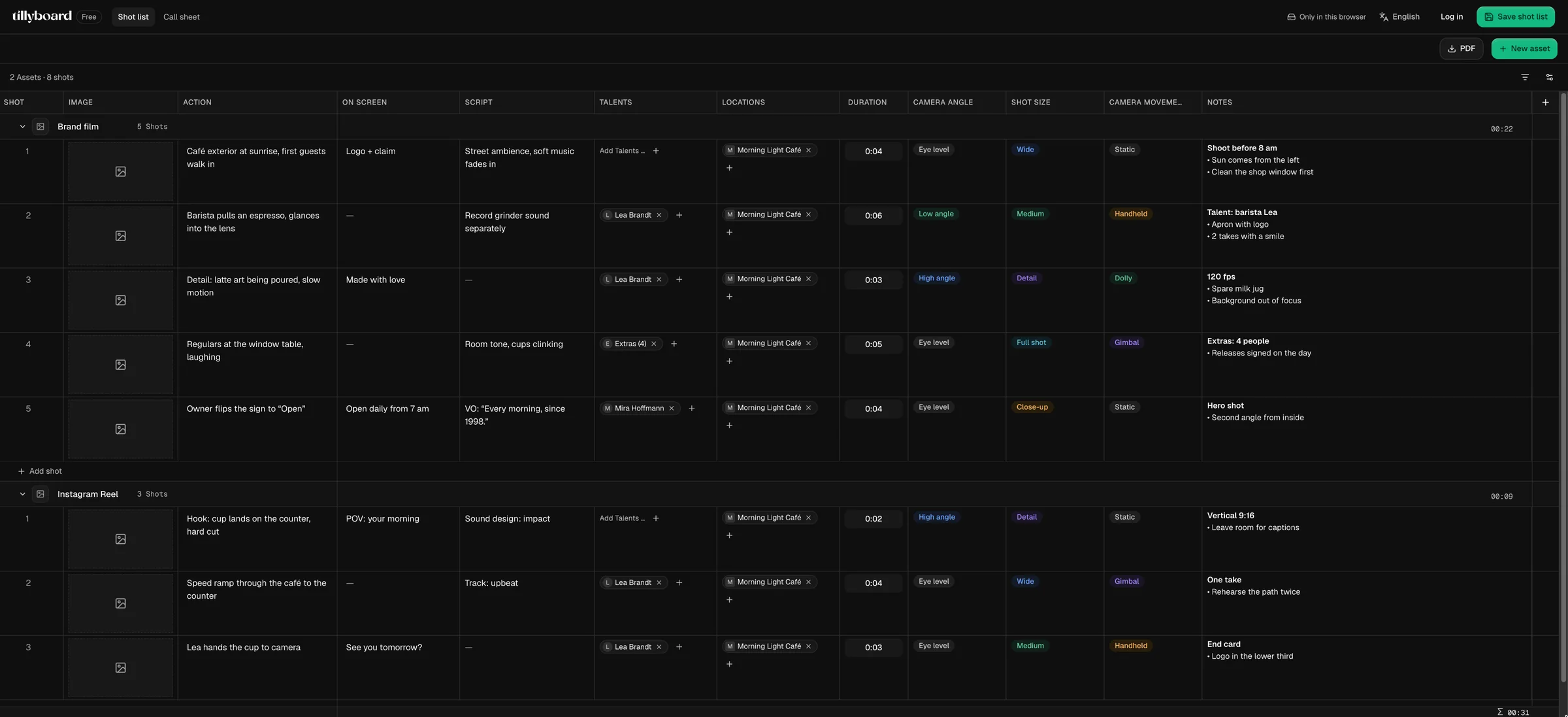
Open the shot list in your browser and start typing. One row per shot with action, on-screen text, script, talents, location, duration, shot size, camera angle and movement. The runtime adds up as you go, and the finished list goes to set as a PDF.
Open the free shot listFree · No sign-up · No credit card
Teams shooting for these brands plan with TillyBoard





A real shot list, not a template to fill in
Templates in Word or Sheets don’t add anything up and don’t remember anything. The free shot list is the same table productions plan with in TillyBoard, just without an account.
Every column the crew asks about
Action, on-screen text, script, talents, locations, duration, camera angle, shot size, camera movement and notes with bullet points. Whatever you don’t need, you switch off.
A runtime that adds up
Each video adds up its shots, and the total sits under the list. In the example the brand film comes to 22 seconds and the reel to 9.
Several videos in one list
Brand film, reel and cutdown sit one below the other as separate assets. Each has its own shots, its own numbering and its own runtime.
How to make your shot list
From an empty browser tab to a finished list on set, without a form or a password.
-
STEP 1
Write down the shots
Open the shot list, create an asset, one row per shot. What happens in frame goes into Action, text in frame into On screen, sound and voice-over into Script.
-
 STEP 2
Set up the camera
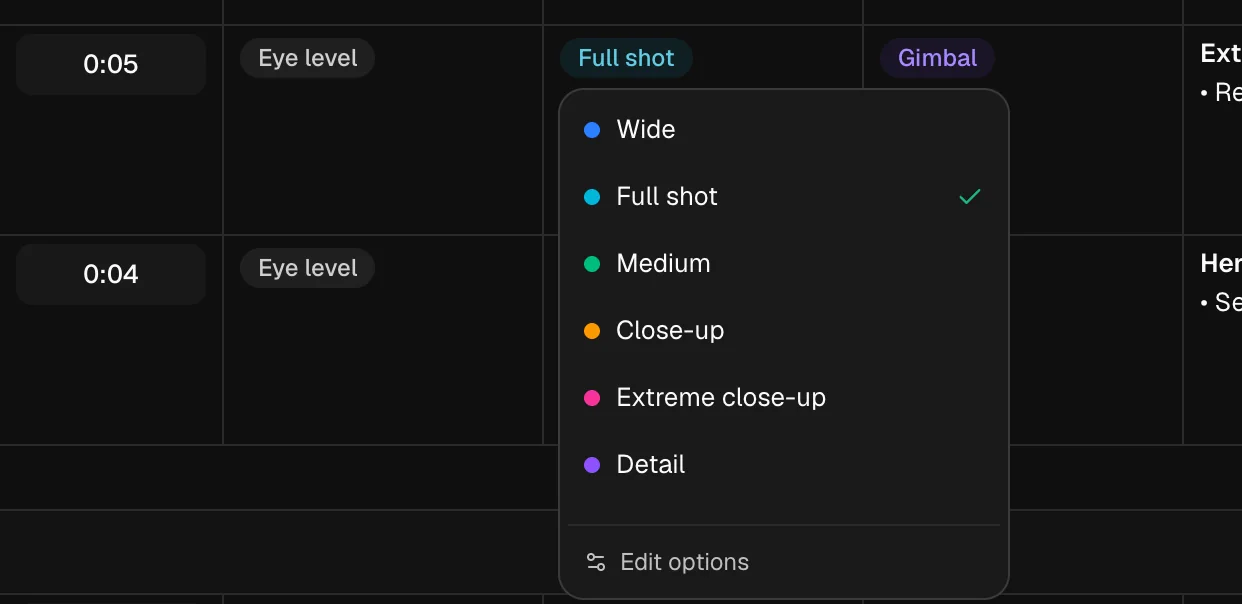
Pick shot size, camera angle and movement from dropdowns. The colours make the list readable before anyone reads a word.
-
 STEP 3
Take it to set
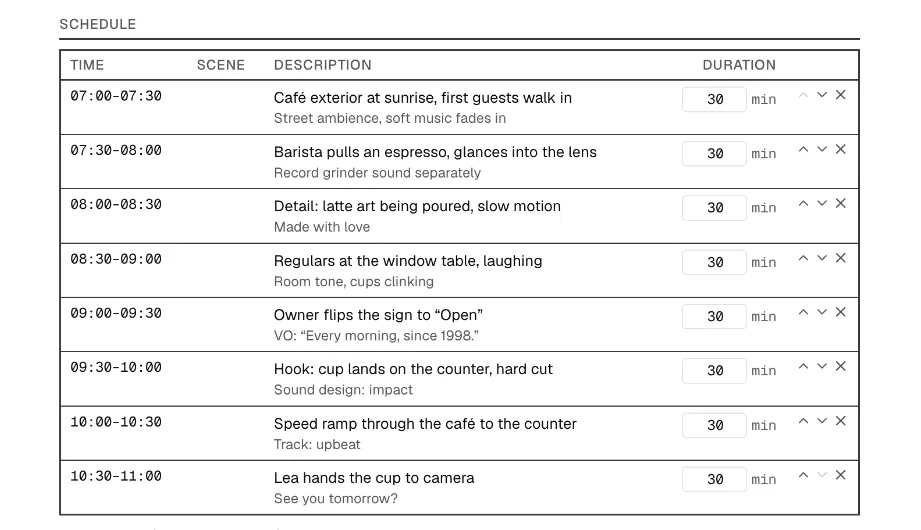
Export it as a PDF or pull it into the running order in the call sheet tab. There every shot gets a time, counted from the shooting call.
Your columns, your terms
A social shoot doesn’t need camera movement, a commercial doesn’t need interview questions. The shot list adapts, instead of you writing around the template.
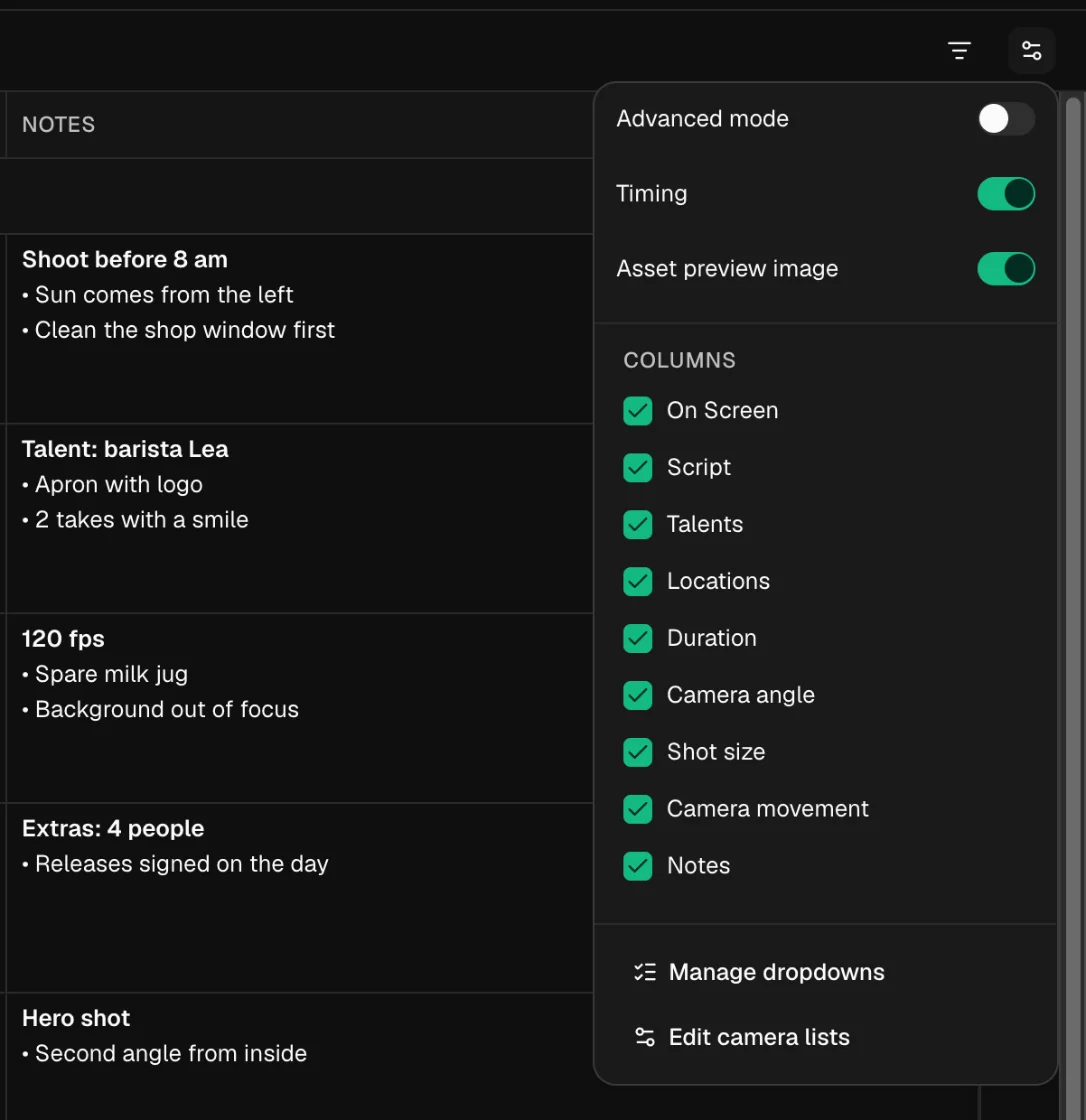
Show and hide columns
On screen, script, talents, locations, duration, camera angle, shot size, camera movement and notes can each be switched on or off.
Your own option lists
The dropdowns come with common values. If you miss “over-the-shoulder” or “drone”, you add it straight from the cell.
Talents and locations as cards
Someone new is added right in the row. The location gets an address, which the call sheet later uses for weather, parking and the hospital.
Without an account or with a free account
Both cost nothing. The difference is where your shot list lives.
| Criterion | Free, no account | Free account |
|---|---|---|
| Price | €0 | €0 |
| Sign-up | None, e-mail optional | With an e-mail address |
| Shot list, schedule, call sheet | Yes | Yes |
| Where your data lives | Only in this browser, not on a server | In your account |
| On several devices | No | Yes, keep working anywhere |
Without an account, clearing your browser data means clearing your shot list. Use “Save shot list” in the top right to move it into a free account at any time.
What goes into a shot list?
A short guide for your first list and a checklist for every one after.
The definition
A shot list names every shot to be filmed for a video, in the order it will appear in the edit. For each shot it says what you see and hear, how the camera is set up and how long it runs in the finished video.
It sits between the script or concept and the shooting schedule. Director and camera usually write it together, and the AD builds the shoot day from it.
The columns almost every production needs
- Shot: the number. It stays the same even if you shoot out of order.
- Action: what happens in frame, in one sentence. “Barista pulls an espresso, glances into the lens.”
- On screen and script: text in frame, voice-over, dialogue and any sound you need to record separately.
- Shot size: from wide to detail. It tells camera how much of the subject is in frame.
- Camera angle and movement: eye level, low or high angle, plus static, pan, dolly, gimbal or handheld. It also decides which gear you bring.
- Duration: how long the shot runs in the finished video. Not to be confused with the time it takes to shoot.
- Talents and location: who is in front of the camera and where. That later decides who needs to be on set when.
- Notes: everything that would otherwise get lost: frame rate, props, light direction, a second angle.
Common mistakes
- The shots add up to 45 seconds, but the spot can only run 30. Writing down the duration shows you before the shoot.
- The action describes a mood instead of a picture. Nobody can shoot “cosy morning”, but anyone can shoot “regulars at the window table, laughing”.
- Sound is missing from the list and therefore from the set. Grinder noise, room tone and voice-over belong in their own column.
- The list sits as a file in someone’s inbox, and half the crew works from an old version on set.
Tip: write the shot list in the order of the edit, not the shoot. The shooting order comes later in the running order, when you sort shots by location and light.
Who the free shot list is for
For anyone who needs a clean list quickly and doesn’t want a subscription for it.
Film students
Practice for the next term project, with the same columns you’ll be asked for on a commercial set later.
Content creators
Reel, TikTok and YouTube video in one list, each with its own runtime. Vertical-format note included.
Freelance filmmakers
Show the client what’s coming before the shoot, as a PDF, without making them sign up anywhere.
Photographers
The shot list works as a photo list too: subject, framing, angle, talent and notes per picture.
Agencies and in-house teams
A quick list for next week’s shoot, without rolling out a tool first.
Small productions
When the list grows and several people plan along, you save it to the free account and carry on as a team.
Free shot list FAQ
Is the shot list really free?
Yes. The shot list in TillyBoard Free costs nothing, needs no sign-up and no credit card. The call sheet next to it is free as well.
Do I need an account?
No. You open the shot list in the browser and start right away. An e-mail address is optional. If you create a free account later, you can save the shot list and keep working on any device.
Where is my shot list stored?
Without an account, only in the browser you are using. Nothing is stored on a server. If you clear the browser data or switch devices, the list is gone. To keep it, save it to a free account.
Which columns does the shot list have?
Shot number, image, action, on-screen text, script, talents, locations, duration, camera angle, shot size, camera movement and notes. You can switch columns off and edit the options of every dropdown.
Can I export the shot list as a PDF?
Yes. The PDF button sits above the list, so everyone on set gets the shot list without opening the app.
Can I turn the shot list into a call sheet?
Yes. In the call sheet tab you add shots from your list to the running order of the day. The times are calculated from the shooting call.
Which languages is the app available in?
English, German, French and Spanish. You switch the language in the top bar.
The first row takes ten seconds
No form, no password, no trial period. Open the shot list and write down the first shot.
Further reading
Free call sheet maker
The call sheet in your browser, with weather and hospital.
Shot list template
Structure, columns and an example to copy.
Guide: create a shot list
Step by step from the script to the list.
B-roll shot list
Plan cutaways before they’re missing.
Shot list in TillyBoard
Segments, preview frames and runtime against the target.
Best shot list apps
The common tools compared.
Storyboard software
From shot to frame before the shoot.
Free tools
Golden hour, depth of field, timecode and more.